# KOKOAMINEN

# Integral Universaali Alakeskusprosessori kokoamisohje

### <span style="background-color: rgb(236, 240, 241);">1. Tarvittavat osat tuotekoodin mukaan</span>


<details id="bkmrk-osat-ovat-hyllyss%C3%A4-k"><summary></summary>


Tuotekoodi on muodossa:

**INTEGRAL D6<span style="background-color: rgb(248, 202, 198);">?? <span style="text-decoration: underline; background-color: rgb(255, 255, 255);">DM</span></span><span style="background-color: rgb(255, 255, 255);"> - X-X-X-X-X-X</span>**

jossa

1. **<span style="background-color: rgb(241, 196, 15);">Integral </span><span style="background-color: rgb(191, 237, 210);"><span style="background-color: rgb(242, 131, 119);">D</span>6 </span><span style="background-color: rgb(255, 255, 255);">= <span style="background-color: rgb(241, 196, 15);">tuotteen nimi<span style="background-color: rgb(194, 224, 244);"><span style="background-color: rgb(242, 131, 119);"> DIN-koteloitu laite </span><span style="background-color: rgb(191, 237, 210);">kuudella moduulipaikalla</span></span></span></span>**
2. <span style="background-color: rgb(248, 202, 198);">**??** = prosessorin tunnus</span>
3. <span style="background-color: rgb(255, 255, 255);">**D** = tuleeko näyttö ( D=kyllä, tyhjä=ei )</span>
4. <span style="background-color: rgb(255, 255, 255);">**M** = tuleeko modeemi ( M=kyllä, tyhjä=ei )</span>
5. <span style="background-color: rgb(255, 255, 255);">**<span style="background-color: rgb(255, 255, 255);"> X-X-X-X-X-X</span>** = moduulipaikat järjestyksessä M1-M6</span>

#### <span style="background-color: rgb(251, 238, 184);">1.1</span> (D6)<span style="background-color: rgb(251, 238, 184);">??</span>... = CPU-SoM

SoMit ovat etukäteen ohjelmoituja, ja niiden pakkauksessa pitäisi lukea sekä ohjelmointipäivämäärä että ohjelmaversio. Jos näitä tietoja ei ole merkitty, SoMit tulisi ohjelmoida [ohjeen ](https://wiki.bithouse.fi/books/integral-universaali-alakeskusprosessori/page/prosessorimoduulin-cpu-som-ohjelmointi)mukaisesti.

<details id="bkmrk-integral-tuotekoodi-"><summary></summary>


<table border="1" cellpadding="0" cellspacing="0" id="bkmrk-integral-tuotekoodi--1" style="border-collapse: collapse; width: 702px; border-width: 1px; border-spacing: 0px; border-color: rgb(0, 0, 0); height: 185px;" width="846"><thead><tr style="height: 0.5px;"><td class="xl66 align-left" height="40" style="height: 47.6px; width: 102.867px; border-width: 1px; border-color: rgb(0, 0, 0);" width="118">**INTEGRAL Tuotekoodi**</td><td class="xl67 align-left" style="width: 72.2px; border-width: 1px; border-color: rgb(0, 0, 0); height: 47.6px;" width="88">**Koodi**</td><td class="xl66 align-left" style="width: 219.2px; border-width: 1px; border-color: rgb(0, 0, 0); height: 47.6px;" width="512">**Nimi**</td><td class="xl66 align-left" style="width: 71.2px; border-width: 1px; border-color: rgb(0, 0, 0); height: 47.6px;" width="64">**Määrä**</td><td class="xl66 align-left" style="width: 302.2px; border-width: 1px; border-color: rgb(0, 0, 0); height: 47.6px;" width="64">**Huom!**</td></tr></thead><tbody><tr style="height: 29.8px;"><td class="xl70 align-left" height="20" style="height: 29.8px; border-width: 1px; border-top: 1px rgb(0, 0, 0); width: 102.867px; border-color: rgb(0, 0, 0);" width="118"><span style="background-color: rgb(251, 238, 184);">D6**<span class="font5">30</span>**</span></td><td class="xl70 align-left" style="border-width: 1px; border-top-style: none; border-left: 1px rgb(0, 0, 0); width: 72.2px; border-color: rgb(0, 0, 0); height: 29.8px;" width="88"> </td><td class="xl71 align-left" style="border-width: 1px; border-top-style: none; border-left: 1px rgb(0, 0, 0); width: 219.2px; border-color: rgb(0, 0, 0); height: 29.8px;" width="512"><span lang="EN-US">Verdin AM62 Dual 1GB ET</span></td><td class="xl72 align-left" style="border-width: 1px; border-top-style: none; border-left: 1px rgb(0, 0, 0); width: 71.2px; border-color: rgb(0, 0, 0); height: 29.8px;" width="64">1</td><td class="xl70 align-left" style="border-width: 1px; border-top-style: none; border-left: 1px rgb(0, 0, 0); width: 302.2px; border-color: rgb(0, 0, 0); height: 29.8px;" width="64"> </td></tr><tr style="height: 29.8px;"><td class="xl70 align-left" height="20" style="height: 29.8px; border-width: 1px; border-top: 1px rgb(0, 0, 0); width: 102.867px; border-color: rgb(0, 0, 0);" width="118"><span style="background-color: rgb(251, 238, 184);">D6**<span class="font5">50</span>**</span></td><td class="xl70 align-left" style="border-width: 1px; border-top-style: none; border-left: 1px rgb(0, 0, 0); width: 72.2px; border-color: rgb(0, 0, 0); height: 29.8px;" width="88">  
</td><td class="xl71 align-left" style="border-width: 1px; border-top-style: none; border-left: 1px rgb(0, 0, 0); width: 219.2px; border-color: rgb(0, 0, 0); height: 29.8px;" width="512"><span lang="EN-US">Verdin AM62 Quad 2GB WB IT</span></td><td class="xl72 align-left" style="border-width: 1px; border-top-style: none; border-left: 1px rgb(0, 0, 0); width: 71.2px; border-color: rgb(0, 0, 0); height: 29.8px;" width="64">1</td><td class="xl70 align-left" style="border-width: 1px; border-top-style: none; border-left: 1px rgb(0, 0, 0); width: 302.2px; border-color: rgb(0, 0, 0); height: 29.8px;" width="64"> </td></tr><tr style="height: 29.8px;"><td style="border-width: 1px; border-top: 1px rgb(0, 0, 0); width: 102.867px; border-color: rgb(0, 0, 0); height: 29.8px;"><span style="background-color: rgb(251, 238, 184);">D6**5<span class="font5">0</span>**</span></td><td style="border-width: 1px; border-top-style: none; border-left: 1px rgb(0, 0, 0); width: 72.2px; border-color: rgb(0, 0, 0); height: 29.8px;">  
</td><td style="border-width: 1px; border-top-style: none; border-left: 1px rgb(0, 0, 0); width: 219.2px; border-color: rgb(0, 0, 0); height: 29.8px;"><span lang="EN-US">Verdin iMX8MM Q 2GB IT</span></td><td style="border-width: 1px; border-top-style: none; border-left: 1px rgb(0, 0, 0); width: 71.2px; border-color: rgb(0, 0, 0); height: 29.8px;">1</td><td style="border-width: 1px; border-top-style: none; border-left: 1px rgb(0, 0, 0); width: 302.2px; border-color: rgb(0, 0, 0); height: 29.8px;">Vain näitä hyllyssä tällä hetkellä</td></tr><tr style="height: 29.8px;"><td class="xl70 align-left" height="20" style="height: 29.8px; border-width: 1px; border-top: 1px rgb(0, 0, 0); width: 102.867px; border-color: rgb(0, 0, 0);" width="118"><span style="background-color: rgb(251, 238, 184);">D6**<span class="font5">70</span>**</span></td><td class="xl70 align-left" style="border-width: 1px; border-top-style: none; border-left: 1px rgb(0, 0, 0); width: 72.2px; border-color: rgb(0, 0, 0); height: 29.8px;" width="88"> </td><td class="xl71 align-left" style="border-width: 1px; border-top-style: none; border-left: 1px rgb(0, 0, 0); width: 219.2px; border-color: rgb(0, 0, 0); height: 29.8px;" width="512"><span lang="EN-US">Verdin iMX8M Plus Quad 8GB WB IT</span></td><td class="xl72 align-left" style="border-width: 1px; border-top-style: none; border-left: 1px rgb(0, 0, 0); width: 71.2px; border-color: rgb(0, 0, 0); height: 29.8px;" width="64">1</td><td class="xl70 align-left" style="border-width: 1px; border-top-style: none; border-left: 1px rgb(0, 0, 0); width: 302.2px; border-color: rgb(0, 0, 0); height: 29.8px;" width="64">  
</td></tr></tbody></table>

</details>
**<span style="background-color: rgb(255, 255, 255);">3. D</span>** = **Näyttö**

  
Jos Integral on näytöllinen, käytä hyllystä löytyvää valmiiksi liimattua näyttöä. Mikäli valmiiksi liimattua näyttöä ei ole saatavilla, näyttö on liimattava vähintään 24 tuntia ennen Integralin kokoamista. Katso näytön valmistus tästä [Ohjeesta!](https://wiki.bithouse.fi/books/integral-universaali-alakeskusprosessori/page/nayton-valmistelu)


**<span style="background-color: rgb(236, 202, 250);">3.</span> tyhjä = Ei näyttöä, vain kansi**

<details id="bkmrk-integral-tuotekoodi--4"><summary></summary>


<table border="1" cellpadding="0" cellspacing="0" id="bkmrk-integral-tuotekoodi--5" style="border-collapse: collapse; width: 845px; border-width: 1px; border-spacing: 0px; border-color: rgb(0, 0, 0);" width="834"><thead><tr style="height: 15.0pt;"><td class="xl68" height="40" style="height: 30pt; width: 113.283px; border-width: 1px; border-color: rgb(0, 0, 0);" width="87">**INTEGRAL tuotekoodi**</td><td class="xl69" style="width: 70.6833px; border-width: 1px; border-color: rgb(0, 0, 0);" width="96">**Koodi**</td><td class="xl70" style="width: 158.367px; border-width: 1px; border-color: rgb(0, 0, 0);" width="523">**Nimi**</td><td class="xl70" style="width: 59.45px; border-width: 1px; border-color: rgb(0, 0, 0);" width="64">**Määrä**</td><td class="xl70" style="width: 437.45px; border-width: 1px; border-color: rgb(0, 0, 0);" width="64">**Huom!**</td></tr></thead><tbody><tr style="height: 15.0pt;"><td class="xl71" height="20" style="height: 15pt; border-width: 1px; border-top: 1px rgb(0, 0, 0); border-color: rgb(0, 0, 0); width: 113.283px;"> </td><td class="xl66" style="border-width: 1px; border-top-style: none; border-left: 1px rgb(0, 0, 0); border-color: rgb(0, 0, 0); width: 70.6833px;"> </td><td class="xl66" style="border-width: 1px; border-top-style: none; border-left: 1px rgb(0, 0, 0); border-color: rgb(0, 0, 0); width: 158.367px;">Kansi</td><td class="xl67" style="border-width: 1px; border-top-style: none; border-left: 1px rgb(0, 0, 0); border-color: rgb(0, 0, 0); width: 59.45px;">1</td><td class="xl67" style="border-width: 1px; border-top-style: none; border-left: 1px rgb(0, 0, 0); border-color: rgb(0, 0, 0); width: 437.45px;">  
</td></tr><tr><td style="border-width: 1px; border-top: 1px rgb(0, 0, 0); border-color: rgb(0, 0, 0); width: 113.283px;"><span style="background-color: rgb(191, 237, 210);">  
</span></td><td style="border-width: 1px; border-top-style: none; border-left: 1px rgb(0, 0, 0); border-color: rgb(0, 0, 0); width: 70.6833px;"> </td><td style="border-width: 1px; border-top-style: none; border-left: 1px rgb(0, 0, 0); border-color: rgb(0, 0, 0); width: 158.367px;">Kansitarra</td><td style="border-width: 1px; border-top-style: none; border-left: 1px rgb(0, 0, 0); border-color: rgb(0, 0, 0); width: 59.45px;">1</td><td style="border-width: 1px; border-top-style: none; border-left: 1px rgb(0, 0, 0); border-color: rgb(0, 0, 0); width: 437.45px;">Toistaisesksi!  
**Tulevaisuudessa saamme kannet, joissa tarra on valmiiksi painettuna.**  
</td></tr></tbody></table>

</details>
**<span style="background-color: rgb(191, 237, 210);">4.</span> <span style="background-color: rgb(191, 237, 210);">M</span> = Modeemi**

<details id="bkmrk-integral-tuotekoodi--6"><summary></summary>


<table border="1" cellpadding="0" cellspacing="0" id="bkmrk-integral-tuotekoodi--7" style="border-collapse: collapse; width: 738px; border-width: 1px; border-spacing: 0px; border-color: rgb(0, 0, 0); height: 137px;" width="834"><thead><tr style="height: 15.0pt;"><td class="xl68" height="40" style="height: 30pt; width: 86.0833px; border-width: 1px; border-color: rgb(0, 0, 0);">**INTEGRAL tuotekoodi**</td><td class="xl69" style="width: 102.483px; border-width: 1px; border-color: rgb(0, 0, 0);">**Koodi**</td><td class="xl70" style="width: 421.167px; border-width: 1px; border-color: rgb(0, 0, 0);">**Nimi**</td><td class="xl70" style="width: 62.25px; border-width: 1px; border-color: rgb(0, 0, 0);">**Määrä**</td><td class="xl70" style="width: 116.25px; border-width: 1px; border-color: rgb(0, 0, 0);">**Huom!**</td></tr></thead><tbody><tr style="height: 15.0pt;"><td class="xl71" height="20" style="height: 15pt; border-width: 1px; border-top: 1px rgb(0, 0, 0); border-color: rgb(0, 0, 0); width: 86.0833px;"><span style="background-color: rgb(191, 237, 210);">**M**</span></td><td class="xl66" style="border-width: 1px; border-top-style: none; border-left: 1px rgb(0, 0, 0); border-color: rgb(0, 0, 0); width: 102.483px;">11461tai 11462 </td><td class="xl66" style="border-width: 1px; border-top-style: none; border-left: 1px rgb(0, 0, 0); border-color: rgb(0, 0, 0); width: 421.167px;"><span lang="EN-US">Fibocom NL668-EU-05 LTE Cat-4 mPCIe</span></td><td class="xl67" style="border-width: 1px; border-top-style: none; border-left: 1px rgb(0, 0, 0); border-color: rgb(0, 0, 0); width: 62.25px;">1</td><td class="xl67" style="border-width: 1px; border-top-style: none; border-left: 1px rgb(0, 0, 0); border-color: rgb(0, 0, 0); width: 116.25px;">  
</td></tr><tr><td style="border-width: 1px; border-top: 1px rgb(0, 0, 0); border-color: rgb(0, 0, 0); width: 86.0833px;"><span style="background-color: rgb(191, 237, 210);">  
</span></td><td style="border-width: 1px; border-top-style: none; border-left: 1px rgb(0, 0, 0); border-color: rgb(0, 0, 0); width: 102.483px;">170216-01</td><td style="border-width: 1px; border-top-style: none; border-left: 1px rgb(0, 0, 0); border-color: rgb(0, 0, 0); width: 421.167px;"><span lang="EN-US">RF Interface Cable SMA/IPEX MHF, 8 cm (antennipiuha)</span></td><td style="border-width: 1px; border-top-style: none; border-left: 1px rgb(0, 0, 0); border-color: rgb(0, 0, 0); width: 62.25px;">1</td><td style="border-width: 1px; border-top-style: none; border-left: 1px rgb(0, 0, 0); border-color: rgb(0, 0, 0); width: 116.25px;">rikka+mutteri</td></tr><tr><td style="border-width: 1px; border-top: 1px rgb(0, 0, 0); border-color: rgb(0, 0, 0); width: 86.0833px;"><span style="background-color: rgb(191, 237, 210);">  
</span></td><td style="border-width: 1px; border-top-style: none; border-left: 1px rgb(0, 0, 0); border-color: rgb(0, 0, 0); width: 102.483px;">  
</td><td style="border-width: 1px; border-top-style: none; border-left: 1px rgb(0, 0, 0); border-color: rgb(0, 0, 0); width: 421.167px;"><span lang="EN-US">Ruuvit M2</span></td><td style="border-width: 1px; border-top-style: none; border-left: 1px rgb(0, 0, 0); border-color: rgb(0, 0, 0); width: 62.25px;">2</td><td style="border-width: 1px; border-top-style: none; border-left: 1px rgb(0, 0, 0); border-color: rgb(0, 0, 0); width: 116.25px;">  
</td></tr></tbody></table>

</details>
**<span style="background-color: rgb(194, 224, 244);">5. </span><span style="background-color: rgb(255, 255, 255);"><span style="background-color: rgb(255, 255, 255);">X-X-X-X-X-X</span> = moduulipaikat järjestyksessä M1-M6</span>**

<details id="bkmrk-valmiiksi-merkityt-l"><summary></summary>


<table border="1" cellpadding="0" cellspacing="0" id="bkmrk-integral-tuotekoodi--8" style="border-collapse: collapse; width: 634pt; border-width: 1px; border-spacing: 0px; border-color: rgb(0, 0, 0); height: 182.6px;" width="846"><colgroup><col style="width: 99px;" width="87"></col><col style="width: 80px;" width="112"></col><col style="width: 320px;" width="527"></col><col style="width: 63px;" width="56"></col><col style="width: 284px;" width="64"></col></colgroup><thead><tr style="height: 46.6px;"><td class="xl71" height="40" style="height: 46.6px; width: 65pt; border-width: 1px; border-color: rgb(0, 0, 0);" width="87">**INTEGRAL tuotekoodi**</td><td class="xl72" style="width: 84pt; border-width: 1px; border-color: rgb(0, 0, 0); height: 46.6px;" width="112">**Koodi**</td><td class="xl73" style="width: 395pt; border-width: 1px; border-color: rgb(0, 0, 0); height: 46.6px;" width="527">**Nimi**</td><td class="xl73" style="width: 42pt; border-width: 1px; border-color: rgb(0, 0, 0); height: 46.6px;" width="56">**Määrä**</td><td class="xl73" style="width: 48pt; border-width: 1px; border-color: rgb(0, 0, 0); height: 46.6px;" width="64">**Huom!**</td></tr></thead><tbody><tr style="height: 29.8px;"><td class="xl69" height="40" rowspan="4" style="border-width: 1px; border-bottom-style: solid; height: 136px; border-top: 1px rgb(0, 0, 0); border-color: rgb(0, 0, 0);" width="87"><span style="background-color: rgb(194, 224, 244);">IO</span><span style="background-color: rgb(194, 224, 244);">  
</span><span style="background-color: rgb(194, 224, 244);">[![IM-IO816.jpg](https://wiki.bithouse.fi/uploads/images/gallery/2026-03/scaled-1680-/im-io816.jpg)](https://wiki.bithouse.fi/uploads/images/gallery/2026-03/im-io816.jpg)</span></td><td class="xl67" style="border-width: 1px; border-top-style: none; border-left: 1px rgb(0, 0, 0); border-color: rgb(0, 0, 0); height: 29.8px;">IM-IO816</td><td class="xl66" style="border-width: 1px; border-top-style: none; border-left: 1px rgb(0, 0, 0); border-color: rgb(0, 0, 0); height: 29.8px;">Integral säätimen I/O-moduuli</td><td class="xl66" style="border-width: 1px; border-top-style: none; border-left: 1px rgb(0, 0, 0); border-color: rgb(0, 0, 0); height: 29.8px;">1</td><td class="xl66" style="border-width: 1px; border-top-style: none; border-left: 1px rgb(0, 0, 0); border-color: rgb(0, 0, 0); height: 29.8px;">  
</td></tr><tr style="height: 46.6px;"><td class="xl67" height="20" style="height: 46.6px; border-width: 1px; border-top-style: none; border-left: 1px rgb(0, 0, 0); border-color: rgb(0, 0, 0);">1862917</td><td class="xl68" style="border-width: 1px; border-top-style: none; border-left: 1px rgb(0, 0, 0); border-color: rgb(0, 0, 0); height: 46.6px;">Pluggable Terminal Block, 3.5 mm, 8 Ways, 28AWG to 16AWG, 1.5 mm², Screw, 8 A</td><td class="xl66" style="border-width: 1px; border-top-style: none; border-left: 1px rgb(0, 0, 0); border-color: rgb(0, 0, 0); height: 46.6px;">2</td><td class="xl66" style="border-width: 1px; border-top-style: none; border-left: 1px rgb(0, 0, 0); border-color: rgb(0, 0, 0); height: 46.6px;">  
</td></tr><tr style="height: 29.8px;"><td style="border-width: 1px; border-top-style: none; border-left: 1px rgb(0, 0, 0); border-color: rgb(0, 0, 0); height: 29.8px;">  
</td><td style="border-width: 1px; border-top-style: none; border-left: 1px rgb(0, 0, 0); border-color: rgb(0, 0, 0); height: 29.8px;">Tarra \[1...8\]</td><td style="border-width: 1px; border-top-style: none; border-left: 1px rgb(0, 0, 0); border-color: rgb(0, 0, 0); height: 29.8px;">1</td><td style="border-width: 1px; border-top-style: none; border-left: 1px rgb(0, 0, 0); border-color: rgb(0, 0, 0); height: 29.8px;">Toistaiseksi  
**Valmiiksi liittimet tulostetuilla merkeilla on tulossa 8.2026**</td></tr><tr style="height: 29.8px;"><td style="border-width: 1px; border-top-style: none; border-left: 1px rgb(0, 0, 0); border-color: rgb(0, 0, 0); height: 29.8px;">  
</td><td style="border-width: 1px; border-top-style: none; border-left: 1px rgb(0, 0, 0); border-color: rgb(0, 0, 0); height: 29.8px;">Tarra \[9...16\]</td><td style="border-width: 1px; border-top-style: none; border-left: 1px rgb(0, 0, 0); border-color: rgb(0, 0, 0); height: 29.8px;">1</td><td style="border-width: 1px; border-top-style: none; border-left: 1px rgb(0, 0, 0); border-color: rgb(0, 0, 0); height: 29.8px;">Toistaiseksi**Valmiiksi liittimet tulostetuilla merkeilla on tulossa 8.2026**</td></tr></tbody></table>

<table border="1" cellpadding="0" cellspacing="0" id="bkmrk-integral-tuotekoodi--9" style="border-collapse: collapse; width: 634pt; border-width: 1px; border-spacing: 0px; border-color: rgb(0, 0, 0); height: 182.6px;" width="846"><colgroup><col style="width: 100px;" width="87"></col><col style="width: 99px;" width="112"></col><col style="width: 396px;" width="527"></col><col style="width: 65px;" width="56"></col><col style="width: 186px;" width="64"></col></colgroup><thead><tr style="height: 46.6px;"><td class="xl71" height="40" style="height: 46.6px; width: 65pt; border-width: 1px; border-color: rgb(0, 0, 0);" width="87">**INTEGRAL tuotekoodi**</td><td class="xl72" style="width: 84pt; border-width: 1px; border-color: rgb(0, 0, 0); height: 46.6px;" width="112">**Koodi**</td><td class="xl73" style="width: 395pt; border-width: 1px; border-color: rgb(0, 0, 0); height: 46.6px;" width="527">**Nimi**</td><td class="xl73" style="width: 42pt; border-width: 1px; border-color: rgb(0, 0, 0); height: 46.6px;" width="56">**Määrä**</td><td class="xl73" style="width: 48pt; border-width: 1px; border-color: rgb(0, 0, 0); height: 46.6px;" width="64">**Huom!**</td></tr></thead><tbody><tr style="height: 29.8px;"><td class="xl68" height="60" rowspan="4" style="border-width: 1px; border-bottom-style: solid; height: 136px; border-top: 1px rgb(0, 0, 0); border-color: rgb(0, 0, 0);"><span style="background-color: rgb(194, 224, 244);">RS2</span>  
<span style="background-color: rgb(194, 224, 244);">[![IM-RS485-2.jpg](https://wiki.bithouse.fi/uploads/images/gallery/2026-03/scaled-1680-/im-rs485-2.jpg)](https://wiki.bithouse.fi/uploads/images/gallery/2026-03/im-rs485-2.jpg)</span></td><td class="xl67" style="border-width: 1px; border-top-style: none; border-left: 1px rgb(0, 0, 0); border-color: rgb(0, 0, 0); height: 29.8px;">IM-RS485-2P</td><td class="xl66" style="border-width: 1px; border-top-style: none; border-left: 1px rgb(0, 0, 0); border-color: rgb(0, 0, 0); height: 29.8px;">Integral säätimen RS485-väyläsovitin, 2 väylää</td><td class="xl66" style="border-width: 1px; border-top-style: none; border-left: 1px rgb(0, 0, 0); border-color: rgb(0, 0, 0); height: 29.8px;">1</td><td class="xl66" style="border-width: 1px; border-top-style: none; border-left: 1px rgb(0, 0, 0); border-color: rgb(0, 0, 0); height: 29.8px;"> </td></tr><tr style="height: 46.6px;"><td class="xl74" height="20" style="height: 46.6px; border-width: 1px; border-top-style: none; border-left: 1px rgb(0, 0, 0); border-color: rgb(0, 0, 0);">1862894</td><td class="xl74" style="border-width: 1px; border-top-style: none; border-left: 1px rgb(0, 0, 0); border-color: rgb(0, 0, 0); height: 46.6px;">Pluggable Terminal Block, 3.5 mm, 6 Ways, 28AWG to 16AWG, 1.5 mm², Screw, 8 A</td><td class="xl74" style="border-width: 1px; border-top-style: none; border-left: 1px rgb(0, 0, 0); border-color: rgb(0, 0, 0); height: 46.6px;">1</td><td class="xl66" style="border-width: 1px; border-top-style: none; border-left: 1px rgb(0, 0, 0); border-color: rgb(0, 0, 0); height: 46.6px;"> </td></tr><tr style="height: 29.8px;"><td class="xl75" height="20" style="height: 29.8px; border-width: 1px; border-top-style: none; border-left: 1px rgb(0, 0, 0); border-color: rgb(0, 0, 0);">JUMPER-H/B</td><td class="xl75" style="border-width: 1px; border-top-style: none; border-left: 1px rgb(0, 0, 0); border-color: rgb(0, 0, 0); height: 29.8px;">Jumpperi; pin; naaras; varren kanssa; 2,54 mm; 1x2; musta</td><td class="xl74" style="border-width: 1px; border-top-style: none; border-left: 1px rgb(0, 0, 0); border-color: rgb(0, 0, 0); height: 29.8px;">6</td><td class="xl66" style="border-width: 1px; border-top-style: none; border-left: 1px rgb(0, 0, 0); border-color: rgb(0, 0, 0); height: 29.8px;">  
</td></tr><tr style="height: 29.8px;"><td style="border-width: 1px; border-top-style: none; border-left: 1px rgb(0, 0, 0); border-color: rgb(0, 0, 0); height: 29.8px;">  
</td><td style="border-width: 1px; border-top-style: none; border-left: 1px rgb(0, 0, 0); border-color: rgb(0, 0, 0); height: 29.8px;">Tarra \[1A...2C\]</td><td style="border-width: 1px; border-top-style: none; border-left: 1px rgb(0, 0, 0); border-color: rgb(0, 0, 0); height: 29.8px;">1</td><td style="border-width: 1px; border-top-style: none; border-left: 1px rgb(0, 0, 0); border-color: rgb(0, 0, 0); height: 29.8px;">Toistaiseksi</td></tr></tbody></table>

<table border="1" cellpadding="0" cellspacing="0" id="bkmrk-integral-tuotekoodi--10" style="border-collapse: collapse; width: 634pt; border-width: 1px; border-spacing: 0px; border-color: rgb(0, 0, 0);" width="846"><colgroup><col style="width: 100px;" width="87"></col><col style="width: 99px;" width="112"></col><col style="width: 395px;" width="527"></col><col style="width: 66px;" width="56"></col><col style="width: 186px;" width="64"></col></colgroup><thead><tr style="height: 15.0pt;"><td class="xl71" height="40" style="height: 30pt; width: 65pt; border-width: 1px; border-color: rgb(0, 0, 0);" width="87">**INTEGRAL tuotekoodi**</td><td class="xl72" style="width: 84pt; border-width: 1px; border-color: rgb(0, 0, 0);" width="112">**Koodi**</td><td class="xl73" style="width: 395pt; border-width: 1px; border-color: rgb(0, 0, 0);" width="527">**Nimi**</td><td class="xl73" style="width: 42pt; border-width: 1px; border-color: rgb(0, 0, 0);" width="56">**Määrä**</td><td class="xl73" style="width: 48pt; border-width: 1px; border-color: rgb(0, 0, 0);" width="64">**Huom!**</td></tr></thead><tbody><tr style="height: 15.0pt;"><td class="xl69" height="40" rowspan="3" style="border-width: 1px; border-bottom: 1px solid rgb(0, 0, 0); height: 30pt; border-top: 1px rgb(0, 0, 0); border-color: rgb(0, 0, 0);"><span style="background-color: rgb(194, 224, 244);">MB20</span>  
<span style="background-color: rgb(194, 224, 244);">[![IM-MBUS20.jpg](https://wiki.bithouse.fi/uploads/images/gallery/2026-03/scaled-1680-/im-mbus20.jpg)](https://wiki.bithouse.fi/uploads/images/gallery/2026-03/im-mbus20.jpg)</span></td><td class="xl67" style="border-width: 1px; border-top: 1px rgb(0, 0, 0); border-left: 1px rgb(0, 0, 0); border-color: rgb(0, 0, 0);">IM-MBUS-10</td><td class="xl66" style="border-width: 1px; border-top: 1px rgb(0, 0, 0); border-left: 1px rgb(0, 0, 0); border-color: rgb(0, 0, 0);">Integral säätimen M-Bus-tasomuunnin 10 mittarille</td><td class="xl66" style="border-width: 1px; border-top: 1px rgb(0, 0, 0); border-left: 1px rgb(0, 0, 0); border-color: rgb(0, 0, 0);">1</td><td class="xl66" style="border-width: 1px; border-top: 1px rgb(0, 0, 0); border-left: 1px rgb(0, 0, 0); border-color: rgb(0, 0, 0);"> </td></tr><tr style="height: 15.0pt;"><td class="xl66" height="20" style="height: 15pt; border-width: 1px; border-top: 1px rgb(0, 0, 0); border-left: 1px rgb(0, 0, 0); border-color: rgb(0, 0, 0);">1792016</td><td class="xl68" style="border-width: 1px; border-top: 1px rgb(0, 0, 0); border-left: 1px rgb(0, 0, 0); border-color: rgb(0, 0, 0);">Pluggable Terminal Block, 5 mm, 2 Ways, 30AWG to 12AWG, 2.5 mm², Screw, 12 A</td><td class="xl66" style="border-width: 1px; border-top: 1px rgb(0, 0, 0); border-left: 1px rgb(0, 0, 0); border-color: rgb(0, 0, 0);">1</td><td class="xl66" style="border-width: 1px; border-top: 1px rgb(0, 0, 0); border-left: 1px rgb(0, 0, 0); border-color: rgb(0, 0, 0);">  
</td></tr><tr><td style="border-width: 1px; border-top-style: none; border-left: 1px rgb(0, 0, 0); border-color: rgb(0, 0, 0);">  
</td><td style="border-width: 1px; border-top-style: none; border-left: 1px rgb(0, 0, 0); border-color: rgb(0, 0, 0);">Tarra \[ME 1 | ME 2\]</td><td style="border-width: 1px; border-top-style: none; border-left: 1px rgb(0, 0, 0); border-color: rgb(0, 0, 0);">1</td><td style="border-width: 1px; border-top-style: none; border-left: 1px rgb(0, 0, 0); border-color: rgb(0, 0, 0);">Toistaiseksi</td></tr></tbody></table>

<table border="1" style="border-collapse: collapse; width: 100%; border-width: 1px; border-color: rgb(0, 0, 0);"><colgroup><col style="width: 12.7081%;"></col><col style="width: 15.0186%;"></col><col style="width: 46.2081%;"></col><col style="width: 6.16451%;"></col><col style="width: 20.0248%;"></col></colgroup><thead><tr><td style="border-color: rgb(0, 0, 0);">**INTEGRAL tuotekoodi**</td><td class="xl72" style="width: 84pt; border-width: 1px; border-color: rgb(0, 0, 0);" width="112">**Koodi**</td><td class="xl73" style="width: 395pt; border-width: 1px; border-color: rgb(0, 0, 0);" width="527">**Nimi**</td><td class="xl73" style="width: 42pt; border-width: 1px; border-color: rgb(0, 0, 0);" width="56">**Määrä**</td><td class="xl73" style="width: 48pt; border-width: 1px; border-color: rgb(0, 0, 0);" width="64">**Huom!**</td></tr></thead><tbody><tr><td class="xl69" height="40" rowspan="3" style="border-width: 1px; border-bottom: 1px solid rgb(0, 0, 0); height: 30pt; border-top: 1px rgb(0, 0, 0); border-color: rgb(0, 0, 0);"><span style="background-color: rgb(194, 224, 244);">MB250</span>  
</td><td class="xl67" style="border-width: 1px; border-top: 1px rgb(0, 0, 0); border-left: 1px rgb(0, 0, 0); border-color: rgb(0, 0, 0);">IM-MBUS-250</td><td class="xl66" style="border-width: 1px; border-top: 1px rgb(0, 0, 0); border-left: 1px rgb(0, 0, 0); border-color: rgb(0, 0, 0);">Integral säätimen M-Bus-tasomuunnin 250 mittarille</td><td class="xl66" style="border-width: 1px; border-top: 1px rgb(0, 0, 0); border-left: 1px rgb(0, 0, 0); border-color: rgb(0, 0, 0);">1</td><td class="xl66" style="border-width: 1px; border-top: 1px rgb(0, 0, 0); border-left: 1px rgb(0, 0, 0); border-color: rgb(0, 0, 0);"> </td></tr><tr><td class="xl66" height="20" style="height: 15pt; border-width: 1px; border-top: 1px rgb(0, 0, 0); border-left: 1px rgb(0, 0, 0); border-color: rgb(0, 0, 0);">1792016</td><td class="xl68" style="border-width: 1px; border-top: 1px rgb(0, 0, 0); border-left: 1px rgb(0, 0, 0); border-color: rgb(0, 0, 0);">Pluggable Terminal Block, 5 mm, 2 Ways, 30AWG to 12AWG, 2.5 mm², Screw, 12 A</td><td class="xl66" style="border-width: 1px; border-top: 1px rgb(0, 0, 0); border-left: 1px rgb(0, 0, 0); border-color: rgb(0, 0, 0);">1</td><td class="xl66" style="border-width: 1px; border-top: 1px rgb(0, 0, 0); border-left: 1px rgb(0, 0, 0); border-color: rgb(0, 0, 0);">  
</td></tr><tr><td style="border-width: 1px; border-top-style: none; border-left: 1px rgb(0, 0, 0); border-color: rgb(0, 0, 0);">  
</td><td style="border-width: 1px; border-top-style: none; border-left: 1px rgb(0, 0, 0); border-color: rgb(0, 0, 0);">Tarra \[ME 1 | ME 2\]</td><td style="border-width: 1px; border-top-style: none; border-left: 1px rgb(0, 0, 0); border-color: rgb(0, 0, 0);">1</td><td style="border-width: 1px; border-top-style: none; border-left: 1px rgb(0, 0, 0); border-color: rgb(0, 0, 0);">Toistaiseksi</td></tr></tbody></table>

<table border="1" cellpadding="0" cellspacing="0" id="bkmrk-integral-tuotekoodi--11" style="border-collapse: collapse; width: 634pt; border-width: 1px; border-spacing: 0px; border-color: rgb(0, 0, 0);" width="846"><colgroup><col style="width: 99px;" width="87"></col><col style="width: 100px;" width="112"></col><col style="width: 397px;" width="527"></col><col style="width: 65px;" width="56"></col><col style="width: 185px;" width="64"></col></colgroup><thead><tr style="height: 15.0pt;"><td class="xl71" height="40" style="height: 30pt; width: 65pt; border-width: 1px; border-color: rgb(0, 0, 0);" width="87">**INTEGRAL tuotekoodi**</td><td class="xl72" style="width: 84pt; border-width: 1px; border-color: rgb(0, 0, 0);" width="112">**Koodi**</td><td class="xl73" style="width: 395pt; border-width: 1px; border-color: rgb(0, 0, 0);" width="527">**Nimi**</td><td class="xl73" style="width: 42pt; border-width: 1px; border-color: rgb(0, 0, 0);" width="56">**Määrä**</td><td class="xl73" style="width: 48pt; border-width: 1px; border-color: rgb(0, 0, 0);" width="64">**Huom!**</td></tr></thead><tbody><tr style="height: 15.0pt;"><td class="xl69" height="40" rowspan="2" style="border-width: 1px; border-bottom: 1px solid rgb(0, 0, 0); height: 30pt; border-top: 1px rgb(0, 0, 0); border-color: rgb(0, 0, 0);"><span style="background-color: rgb(194, 224, 244);">24V</span></td><td class="xl67" style="border-width: 1px; border-top: 1px rgb(0, 0, 0); border-left: 1px rgb(0, 0, 0); border-color: rgb(0, 0, 0);"> </td><td class="xl66" style="border-width: 1px; border-top: 1px rgb(0, 0, 0); border-left: 1px rgb(0, 0, 0); border-color: rgb(0, 0, 0);">IM-24VDC</td><td class="xl66" style="border-width: 1px; border-top: 1px rgb(0, 0, 0); border-left: 1px rgb(0, 0, 0); border-color: rgb(0, 0, 0);">1</td><td class="xl66" style="border-width: 1px; border-top: 1px rgb(0, 0, 0); border-left: 1px rgb(0, 0, 0); border-color: rgb(0, 0, 0);"> </td></tr><tr style="height: 15.0pt;"><td class="xl66" height="20" style="height: 15pt; border-width: 1px; border-top: 1px rgb(0, 0, 0); border-left: 1px rgb(0, 0, 0); border-color: rgb(0, 0, 0);"> </td><td class="xl68" style="border-width: 1px; border-top: 1px rgb(0, 0, 0); border-left: 1px rgb(0, 0, 0); border-color: rgb(0, 0, 0);"> </td><td class="xl66" style="border-width: 1px; border-top: 1px rgb(0, 0, 0); border-left: 1px rgb(0, 0, 0); border-color: rgb(0, 0, 0);"> </td><td class="xl66" style="border-width: 1px; border-top: 1px rgb(0, 0, 0); border-left: 1px rgb(0, 0, 0); border-color: rgb(0, 0, 0);">  
</td></tr></tbody></table>

<table border="1" cellpadding="0" cellspacing="0" id="bkmrk-integral-tuotekoodi--12" style="border-collapse: collapse; width: 634pt; border-spacing: 0px; border: 1px solid rgb(0, 0, 0); height: 246.75px;" width="846"><colgroup><col style="width: 128px;" width="87"></col><col style="width: 118px;" width="112"></col><col style="width: 348px;" width="527"></col><col style="width: 65px;" width="56"></col><col style="width: 187px;" width="64"></col></colgroup><thead><tr style="height: 46.6px;"><td class="xl71" height="40" style="height: 46.6px; width: 65pt; border-width: 1px; border-color: rgb(0, 0, 0);" width="87">**INTEGRAL tuotekoodi**</td><td class="xl72" style="width: 84pt; border-width: 1px; border-color: rgb(0, 0, 0); height: 46.6px;" width="112">**Koodi**</td><td class="xl73" style="width: 395pt; border-width: 1px; border-color: rgb(0, 0, 0); height: 46.6px;" width="527">**Nimi**</td><td class="xl73" style="width: 42pt; border-width: 1px; border-color: rgb(0, 0, 0); height: 46.6px;" width="56">**Määrä**</td><td class="xl73" style="width: 48pt; border-width: 1px; border-color: rgb(0, 0, 0); height: 46.6px;" width="64">**Huom!**</td></tr></thead><tbody><tr style="height: 200.15px;"><td class="xl69" height="40" style="border-width: 1px; border-bottom-style: solid; height: 200.15px; border-top: 1px rgb(0, 0, 0); border-color: rgb(0, 0, 0);"><span style="background-color: rgb(194, 224, 244);">USB</span>

[![IM-USB-4C.jpg](https://wiki.bithouse.fi/uploads/images/gallery/2026-03/scaled-1680-/im-usb-4c.jpg)](https://wiki.bithouse.fi/uploads/images/gallery/2026-03/im-usb-4c.jpg)

</td><td class="xl67" style="border-width: 1px; border-top-style: none; border-left: 1px rgb(0, 0, 0); border-color: rgb(0, 0, 0); height: 200.15px;">IM-USB-C-4P</td><td class="xl66" style="border-width: 1px; border-top-style: none; border-left: 1px rgb(0, 0, 0); border-color: rgb(0, 0, 0); height: 200.15px;">Intergal säätimen sovitin 4:lle USB C-liittimelle</td><td class="xl66" style="border-width: 1px; border-top-style: none; border-left: 1px rgb(0, 0, 0); border-color: rgb(0, 0, 0); height: 200.15px;">1</td><td class="xl66" style="border-width: 1px; border-top-style: none; border-left: 1px rgb(0, 0, 0); border-color: rgb(0, 0, 0); height: 200.15px;">  
</td></tr></tbody></table>

</details>
#### 1.5 Yhteiset osat

<details id="bkmrk-%C2%A0-koodi-nimi%C2%A0-m%C3%A4%C3%A4r%C3%A4-"><summary></summary>


<table border="1" cellpadding="0" cellspacing="0" id="bkmrk-%C2%A0-koodi-nimi%C2%A0-m%C3%A4%C3%A4r%C3%A4--1" style="border-collapse: collapse; width: 711px; border-width: 1px; border-spacing: 0px; border-color: rgb(0, 0, 0); height: 360px;" width="885"><thead><tr style="height: 0.466675px;"><td class="xl71" height="40" style="height: 40.9333px; width: 94.5333px; border-width: 1px; border-color: rgb(0, 0, 0);"> </td><td class="xl72" style="width: 111.2px; border-width: 1px; border-color: rgb(0, 0, 0); height: 40.9333px;">**Koodi**</td><td class="xl73" style="width: 316.2px; border-width: 1px; border-color: rgb(0, 0, 0); height: 40.9333px;">**Nimi** </td><td class="xl72" style="width: 71.2px; border-width: 1px; border-color: rgb(0, 0, 0); height: 40.9333px;">**Määrä**</td><td class="xl74" style="width: 183.2px; border-width: 1px; border-color: rgb(0, 0, 0); height: 40.9333px;">**Huom!**</td></tr></thead><tbody><tr style="height: 29.7167px;"><td class="xl69" height="20" style="height: 29.7167px; border-width: 1px; border-top: 1px rgb(0, 0, 0); border-color: rgb(0, 0, 0); width: 94.5333px;">POHJA</td><td class="xl68" style="border-width: 1px; border-top-style: none; border-left: 1px rgb(0, 0, 0); border-color: rgb(0, 0, 0); height: 29.7167px; width: 111.2px;">P05120201F.BL</td><td class="xl68" style="border-width: 1px; border-top-style: none; border-left: 1px rgb(0, 0, 0); border-color: rgb(0, 0, 0); height: 29.7167px; width: 316.2px;">PANEL MODULBOX WITHOUT FRAME</td><td class="xl68" style="border-width: 1px; border-top-style: none; border-left: 1px rgb(0, 0, 0); border-color: rgb(0, 0, 0); height: 29.7167px; width: 71.2px;">1</td><td class="xl75" style="border-width: 1px; border-top-style: none; border-left: 1px rgb(0, 0, 0); width: 183.2px; border-color: rgb(0, 0, 0); height: 29.7167px;">mustat "klipsut" myös</td></tr><tr style="height: 29.7167px;"><td class="xl69" height="20" style="height: 29.7167px; border-width: 1px; border-top: 1px rgb(0, 0, 0); border-color: rgb(0, 0, 0); width: 94.5333px;">KOTELO</td><td class="xl68" style="border-width: 1px; border-top-style: none; border-left: 1px rgb(0, 0, 0); border-color: rgb(0, 0, 0); height: 29.7167px; width: 111.2px;">25.1202000.BL</td><td class="xl68" style="border-width: 1px; border-top-style: none; border-left: 1px rgb(0, 0, 0); border-color: rgb(0, 0, 0); height: 29.7167px; width: 316.2px;"><span lang="EN-US">Modulbox XTS WITH VENTS 12MH53V-A</span></td><td class="xl68" style="border-width: 1px; border-top-style: none; border-left: 1px rgb(0, 0, 0); border-color: rgb(0, 0, 0); height: 29.7167px; width: 71.2px;">1</td><td class="xl75" style="border-width: 1px; border-top-style: none; border-left: 1px rgb(0, 0, 0); width: 183.2px; border-color: rgb(0, 0, 0); height: 29.7167px;"> </td></tr><tr style="height: 29.7167px;"><td class="xl69" height="20" style="height: 29.7167px; border-width: 1px; border-top: 1px rgb(0, 0, 0); border-color: rgb(0, 0, 0); width: 94.5333px;">PÄÄKORTTI</td><td class="xl68" style="border-width: 1px; border-top-style: none; border-left: 1px rgb(0, 0, 0); border-color: rgb(0, 0, 0); height: 29.7167px; width: 111.2px;">Tora\_Web\_CPU</td><td class="xl68" style="border-width: 1px; border-top-style: none; border-left: 1px rgb(0, 0, 0); border-color: rgb(0, 0, 0); height: 29.7167px; width: 316.2px;">Tora\_Web\_CPU</td><td class="xl68" style="border-width: 1px; border-top-style: none; border-left: 1px rgb(0, 0, 0); border-color: rgb(0, 0, 0); height: 29.7167px; width: 71.2px;">1</td><td class="xl75" style="border-width: 1px; border-top-style: none; border-left: 1px rgb(0, 0, 0); width: 183.2px; border-color: rgb(0, 0, 0); height: 29.7167px;">tarkista kortin versio CPU-SoM-ohjelmointia varten</td></tr><tr style="height: 29.7167px;"><td class="xl69" height="20" style="height: 29.7167px; border-width: 1px; border-top: 1px rgb(0, 0, 0); border-color: rgb(0, 0, 0); width: 94.5333px;">RUUVI</td><td class="xl68" style="border-width: 1px; border-top-style: none; border-left: 1px rgb(0, 0, 0); border-color: rgb(0, 0, 0); height: 29.7167px; width: 111.2px;">2099314</td><td class="xl68" style="border-width: 1px; border-top-style: none; border-left: 1px rgb(0, 0, 0); border-color: rgb(0, 0, 0); height: 29.7167px; width: 316.2px;">Ruuvi; M3x6; 0,5; Pää: kartio; Pozidriv; PZ1; teräs; sinkki; DIN 966A</td><td class="xl68" style="border-width: 1px; border-top-style: none; border-left: 1px rgb(0, 0, 0); border-color: rgb(0, 0, 0); height: 29.7167px; width: 71.2px;">12</td><td class="xl76" style="border-width: 1px; border-top-style: none; border-left: 1px rgb(0, 0, 0); width: 183.2px; border-color: rgb(0, 0, 0); height: 29.7167px;">moduulien kiinnitykseen</td></tr><tr style="height: 29.7167px;"><td class="xl69" height="20" style="height: 29.7167px; border-width: 1px; border-top: 1px rgb(0, 0, 0); border-color: rgb(0, 0, 0); width: 94.5333px;">HOLKKI LYHYT</td><td class="xl68" style="border-width: 1px; border-top-style: none; border-left: 1px rgb(0, 0, 0); border-color: rgb(0, 0, 0); height: 29.7167px; width: 111.2px;">TP-8</td><td class="xl68" style="border-width: 1px; border-top-style: none; border-left: 1px rgb(0, 0, 0); border-color: rgb(0, 0, 0); height: 29.7167px; width: 316.2px;">Kierteitetty väliholkki; kuusikulmainen; polyamidi; M3; M3; 8mm</td><td class="xl68" style="border-width: 1px; border-top-style: none; border-left: 1px rgb(0, 0, 0); border-color: rgb(0, 0, 0); height: 29.7167px; width: 71.2px;">12</td><td class="xl75" style="border-width: 1px; border-top-style: none; border-left: 1px rgb(0, 0, 0); width: 183.2px; border-color: rgb(0, 0, 0); height: 29.7167px;">moduulien kiinnitykseen</td></tr><tr style="height: 29.7167px;"><td class="xl69" height="20" style="height: 29.7167px; border-width: 1px; border-top: 1px rgb(0, 0, 0); border-color: rgb(0, 0, 0); width: 94.5333px;">HOLKKI PITKÄ</td><td class="xl68" style="border-width: 1px; border-top-style: none; border-left: 1px rgb(0, 0, 0); border-color: rgb(0, 0, 0); height: 29.7167px; width: 111.2px;">TP-19</td><td class="xl68" style="border-width: 1px; border-top-style: none; border-left: 1px rgb(0, 0, 0); border-color: rgb(0, 0, 0); height: 29.7167px; width: 316.2px;">Kierteitetty väliholkki; kuusikulmainen; polyamidi; M3; M3; 19mm</td><td class="xl68" style="border-width: 1px; border-top-style: none; border-left: 1px rgb(0, 0, 0); border-color: rgb(0, 0, 0); height: 29.7167px; width: 71.2px;">12</td><td class="xl75" style="border-width: 1px; border-top-style: none; border-left: 1px rgb(0, 0, 0); width: 183.2px; border-color: rgb(0, 0, 0); height: 29.7167px;">moduulien kiinnitykseen</td></tr><tr style="height: 29.7167px;"><td class="xl69" height="20" style="height: 29.7167px; border-width: 1px; border-top: 1px rgb(0, 0, 0); border-color: rgb(0, 0, 0); width: 94.5333px;">PARISTO</td><td class="xl75" style="border-width: 1px; border-top-style: none; border-left: 1px rgb(0, 0, 0); width: 111.2px; border-color: rgb(0, 0, 0); height: 29.7167px;"><span lang="EN-US">CR1220</span></td><td class="xl75" style="border-width: 1px; border-top-style: none; border-left: 1px rgb(0, 0, 0); width: 316.2px; border-color: rgb(0, 0, 0); height: 29.7167px;"><span lang="EN-US">Nappiparisto</span></td><td class="xl75" style="border-width: 1px; border-top-style: none; border-left: 1px rgb(0, 0, 0); width: 71.2px; border-color: rgb(0, 0, 0); height: 29.7167px;">1</td><td class="xl75" style="border-width: 1px; border-top-style: none; border-left: 1px rgb(0, 0, 0); width: 183.2px; border-color: rgb(0, 0, 0); height: 29.7167px;"> </td></tr><tr style="height: 29.7167px;"><td class="xl69" height="20" style="height: 29.7167px; border-width: 1px; border-top: 1px rgb(0, 0, 0); border-color: rgb(0, 0, 0); width: 94.5333px;">LIITIN</td><td class="xl68" style="border-width: 1px; border-top-style: none; border-left: 1px rgb(0, 0, 0); border-color: rgb(0, 0, 0); height: 29.7167px; width: 111.2px;">1757022</td><td class="xl68" style="border-width: 1px; border-top-style: none; border-left: 1px rgb(0, 0, 0); border-color: rgb(0, 0, 0); height: 29.7167px; width: 316.2px;">MSTB2,5/3-ST-5,08<span style="mso-spacerun: yes;"> </span>terminal block</td><td class="xl68" style="border-width: 1px; border-top-style: none; border-left: 1px rgb(0, 0, 0); border-color: rgb(0, 0, 0); height: 29.7167px; width: 71.2px;">1</td><td class="xl75" style="border-width: 1px; border-top-style: none; border-left: 1px rgb(0, 0, 0); width: 183.2px; border-color: rgb(0, 0, 0); height: 29.7167px;">virtaliitin</td></tr><tr style="height: 29.7167px;"><td class="xl69" height="20" style="height: 29.7167px; border-width: 1px; border-top: 1px rgb(0, 0, 0); border-color: rgb(0, 0, 0); width: 94.5333px;">TARRA</td><td class="xl75" style="border-width: 1px; border-top-style: none; border-left: 1px rgb(0, 0, 0); width: 111.2px; border-color: rgb(0, 0, 0); height: 29.7167px;"> </td><td class="xl75" style="border-width: 1px; border-top-style: none; border-left: 1px rgb(0, 0, 0); width: 316.2px; border-color: rgb(0, 0, 0); height: 29.7167px;"><span lang="EN-US">Moduulitarra \[M1...M6\]</span></td><td class="xl75" style="border-width: 1px; border-top-style: none; border-left: 1px rgb(0, 0, 0); width: 71.2px; border-color: rgb(0, 0, 0); height: 29.7167px;">2</td><td class="xl76" style="border-width: 1px; border-top-style: none; border-left: 1px rgb(0, 0, 0); width: 183.2px; border-color: rgb(0, 0, 0); height: 29.7167px;"> </td></tr></tbody></table>

[![PIENkeräily_yhteiset_osat.jpg](https://wiki.bithouse.fi/uploads/images/gallery/2026-03/scaled-1680-/pienkeraily-yhteiset-osat.jpg)](https://wiki.bithouse.fi/uploads/images/gallery/2026-03/pienkeraily-yhteiset-osat.jpg)

</details></details>

### 2. Kokoaminen


<details id="bkmrk-4.1-vakio-osat-4.1.1"><summary></summary>

![Kytkentäkuva-IntegralFI.png](https://wiki.bithouse.fi/uploads/images/gallery/2026-02/scaled-1680-/kytkentakuva-integralfi.png)

##### 2.1.1 Paristo

<details id="bkmrk-aseta-kellon-paristo"><summary></summary>

- Aseta kellon **paristo** paikoilleen.

![paristo1.jpg](https://wiki.bithouse.fi/uploads/images/gallery/2025-12/scaled-1680-/paristo1.jpg)

</details>##### <span style="background-color: rgb(194, 224, 244);">2.1.2 Moduulit</span>

<details id="bkmrk-tarkista-tuotekoodis"><summary></summary>


[![moduulipaikat-simple.png](https://wiki.bithouse.fi/uploads/images/gallery/2026-03/scaled-1680-/moduulipaikat-simple.png)](https://wiki.bithouse.fi/uploads/images/gallery/2026-03/moduulipaikat-simple.png)

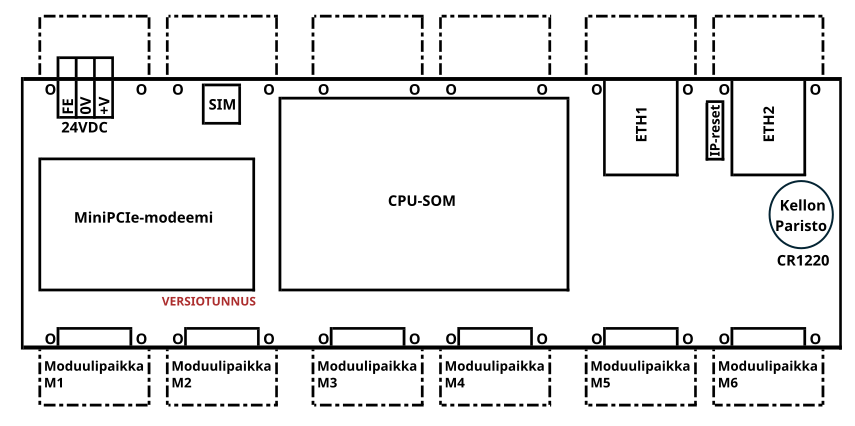
- Tarkista tuotekoodista moduulien oikeat paikat pääkortissa: 
    - merkkisarja esimerkiksi <span style="background-color: rgb(194, 224, 244);">\[IO-IO-IO-IO-X-RS\]</span><table border="1" class="align-left" style="border-collapse: collapse; width: 129.422%; height: 177.6px;"><colgroup><col style="width: 45.8878%;"></col><col style="width: 54.1688%;"></col></colgroup><tbody><tr style="height: 29.6px;"><td style="height: 29.6px;">Moduulipaikka 1</td><td style="height: 29.6px;">IM-IO816</td></tr><tr style="height: 29.6px;"><td style="height: 29.6px;">Moduulipaikka 2</td><td style="height: 29.6px;">IM-IO816</td></tr><tr style="height: 29.6px;"><td style="height: 29.6px;">Moduulipaikka 3</td><td style="height: 29.6px;">IM-IO816</td></tr><tr style="height: 29.6px;"><td style="height: 29.6px;">Moduulipaikka 4</td><td style="height: 29.6px;">IM-IO816</td></tr><tr style="height: 29.6px;"><td style="height: 29.6px;">Moduulipaikka 5
        
        </td><td style="height: 29.6px;">ei moduulia</td></tr><tr style="height: 29.6px;"><td style="height: 29.6px;">Moduulipaikka 6</td><td style="height: 29.6px;">IM-RS485-2</td></tr></tbody></table>

<p class="callout info">Jos päätyihin ei tule muuta, laitetaan päätypaikkoihin (moduulipaikat 1 ja 6) tyhjä kortti. Näille ei ole erillistä merkintää tilauskoodissa.</p>

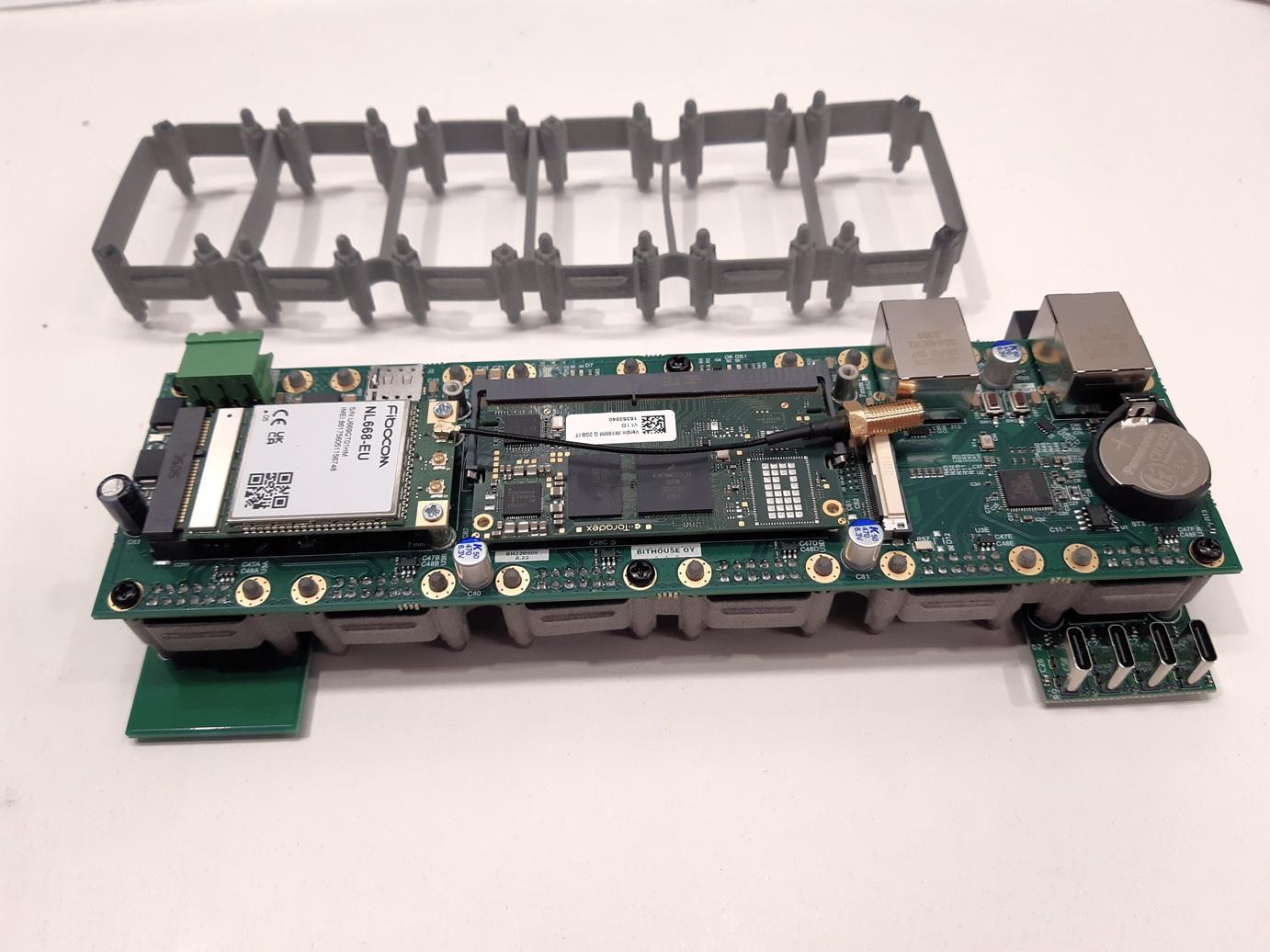
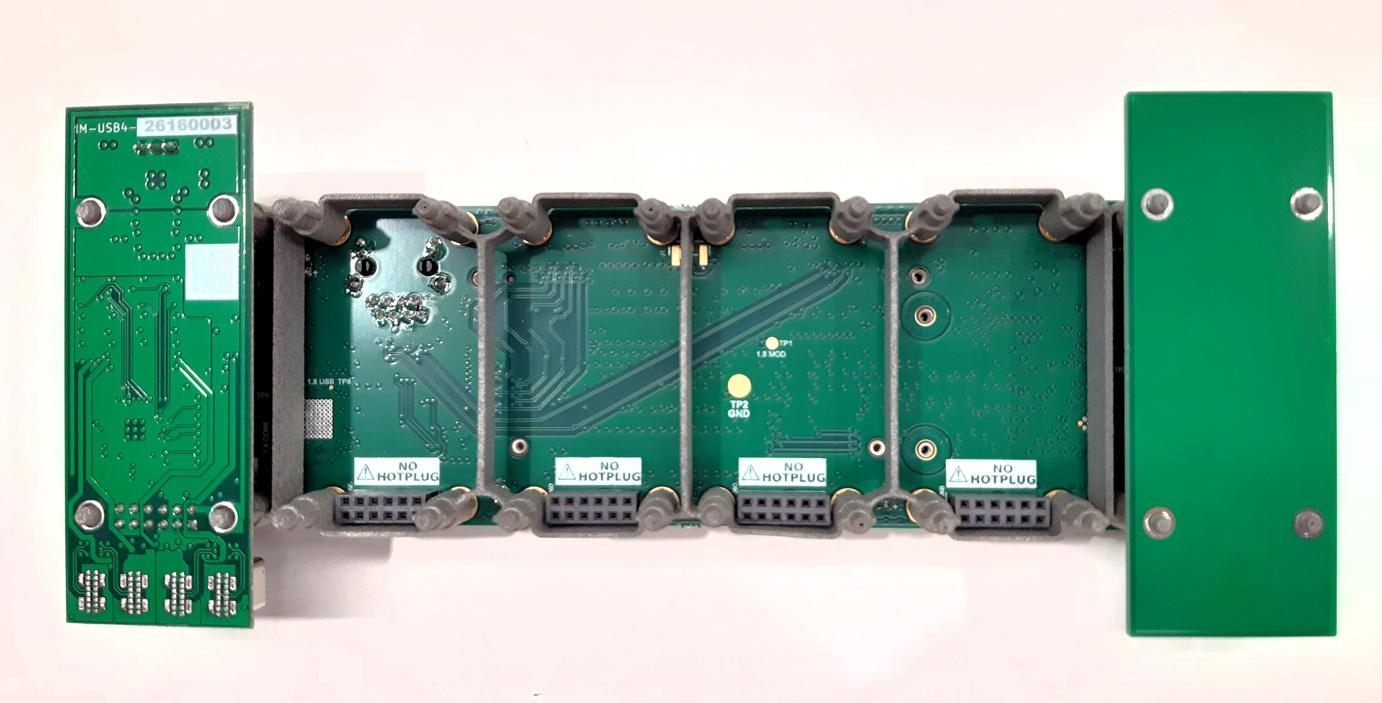
- Kiinnitä moduulikehys pääkorttiin. 
    - Moduulikehyksessä on alapuolella jokaisen moduulin kohdalla neljä tappia. Yläpuolella on tappeja ja ruuvinreikiä.
    - Aseta kehys niin, että ruuvinreiät tulevat pääkorttiin päin.
    - Ruuvaa kehys kiinni pääkorttiin (samat ruuvit kuin näytön lisäkortissa tai vastaavat)
- Kiinnitä moduulit kehykseen, ei ruuveja, vain napsautetaan paikoilleen. 
    - Varo etteivät moduulit irtoa, ne pysyvät kunnolla paikallaan vain kotelon pohjan tuella.

[![moduulikehysPIEN.jpg](https://wiki.bithouse.fi/uploads/images/gallery/2026-07/scaled-1680-/moduulikehyspien.jpg)](https://wiki.bithouse.fi/uploads/images/gallery/2026-07/moduulikehyspien.jpg)
[![moduulikehys-pohjaPIEN.jpg](https://wiki.bithouse.fi/uploads/images/gallery/2026-07/scaled-1680-/moduulikehys-pohjapien.jpg)](https://wiki.bithouse.fi/uploads/images/gallery/2026-07/moduulikehys-pohjapien.jpg)
</details>##### <span style="background-color: rgb(251, 238, 184);">2.1.3 CPU-SoM</span>

<details id="bkmrk-liu%27uta-prosessori-k"><summary></summary>


- Liu'uta prosessori kiinni liittimiin. Paina alas, jolloin se lukittuu paikoilleen.

![CPU_paikoilleen.jpg](https://wiki.bithouse.fi/uploads/images/gallery/2025-04/scaled-1680-/cpu-paikoilleen.jpg)

- Mikäli prosessori ei lukitu kunnolla, nosta lyhyillä sivuilla olevia jousia varovasti esim. ruuvimeisselillä, jolloin jouset pääsevät loksahtamaan paikoilleen.

![CPU-SoM-kiinnitys10.jpg](https://wiki.bithouse.fi/uploads/images/gallery/2026-02/scaled-1680-/cpu-som-kiinnitys10.jpg)

- Tarvittaessa lukituksen voi vapauttaa lyhyillä sivuilla olevista jousista, vetämällä niitä ulospäin.

</details>##### <span style="background-color: rgb(198, 245, 247);">2.2.1 SIM-kortti</span>

<details id="bkmrk-sim-kortti-laitetaan"><summary></summary>

- SIM-kortti laitetaan vain tarvittaessa. 
    - - - Tämän näkee [INTEGRAL PRODUCTION](https://docs.google.com/spreadsheets/d/1pupkZCM5NyyzgvCC0XG2sC6sJNPZkWRU-GR4wH_WI8U/edit?gid=0#gid=0) tiedostossa.

</details>##### <span style="background-color: rgb(191, 237, 210);">2.2.2 Modeemi ja antenni</span>

<details id="bkmrk-modeemi-asennetaan-v"><summary></summary>


Jos laite sisältää modeemin:

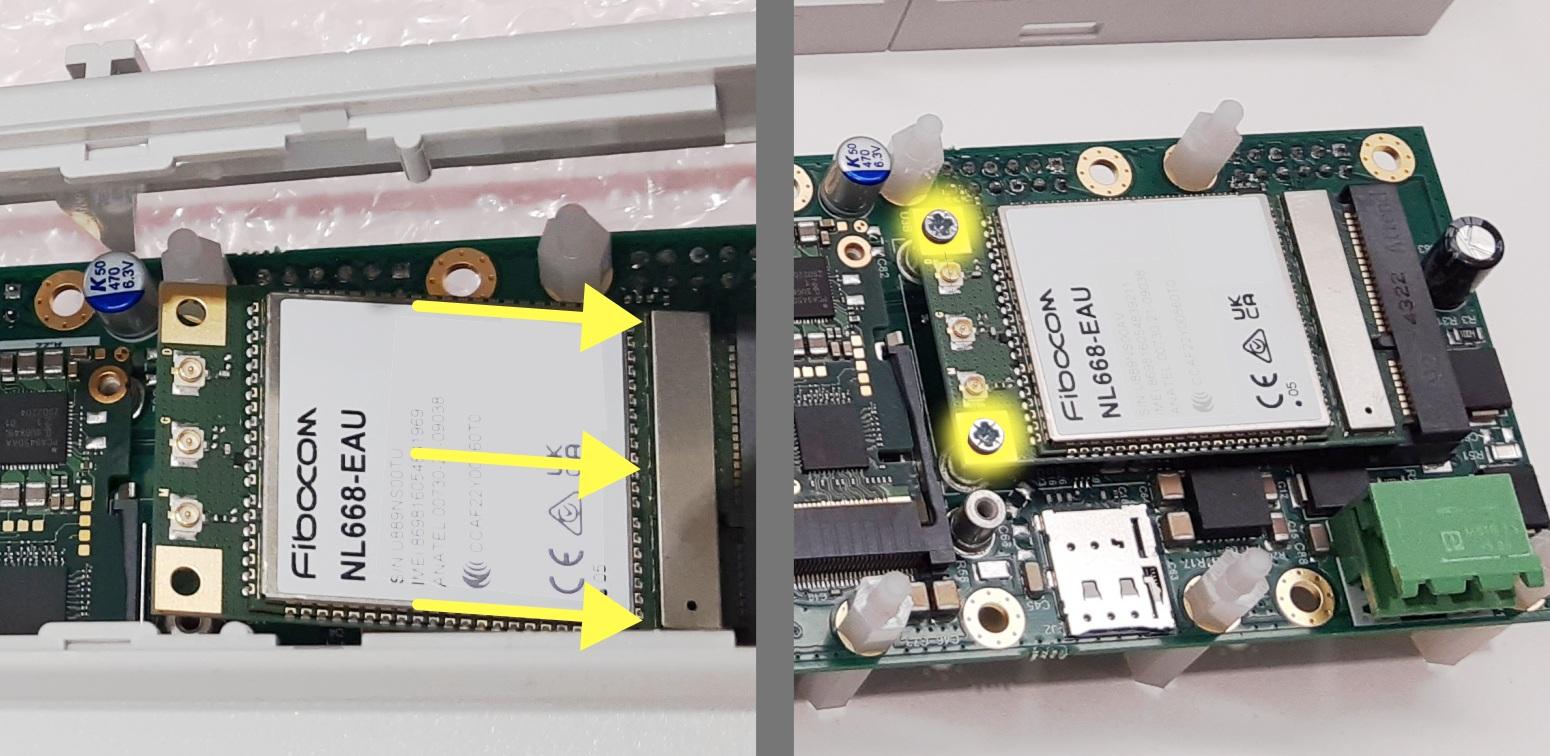
- Liu'uta modeemi paikoilleen. Kiinnitä toisesta päästä M2 -ruuveilla.

<p class="callout warning"><span style="color: rgb(0, 0, 0);">HUOM! Ruuvin vastakappaleet ovat ainoastaan kolvauksella kiinni piirilevyssä - kiristä ruuvit napakasti mutta älä käytä liikaa voimaa.</span></p>

![PIEN_modeemi_paikoilleen_ruuvit3.jpg](https://wiki.bithouse.fi/uploads/images/gallery/2026-02/scaled-1680-/pien-modeemi-paikoilleen-ruuvit3.jpg)

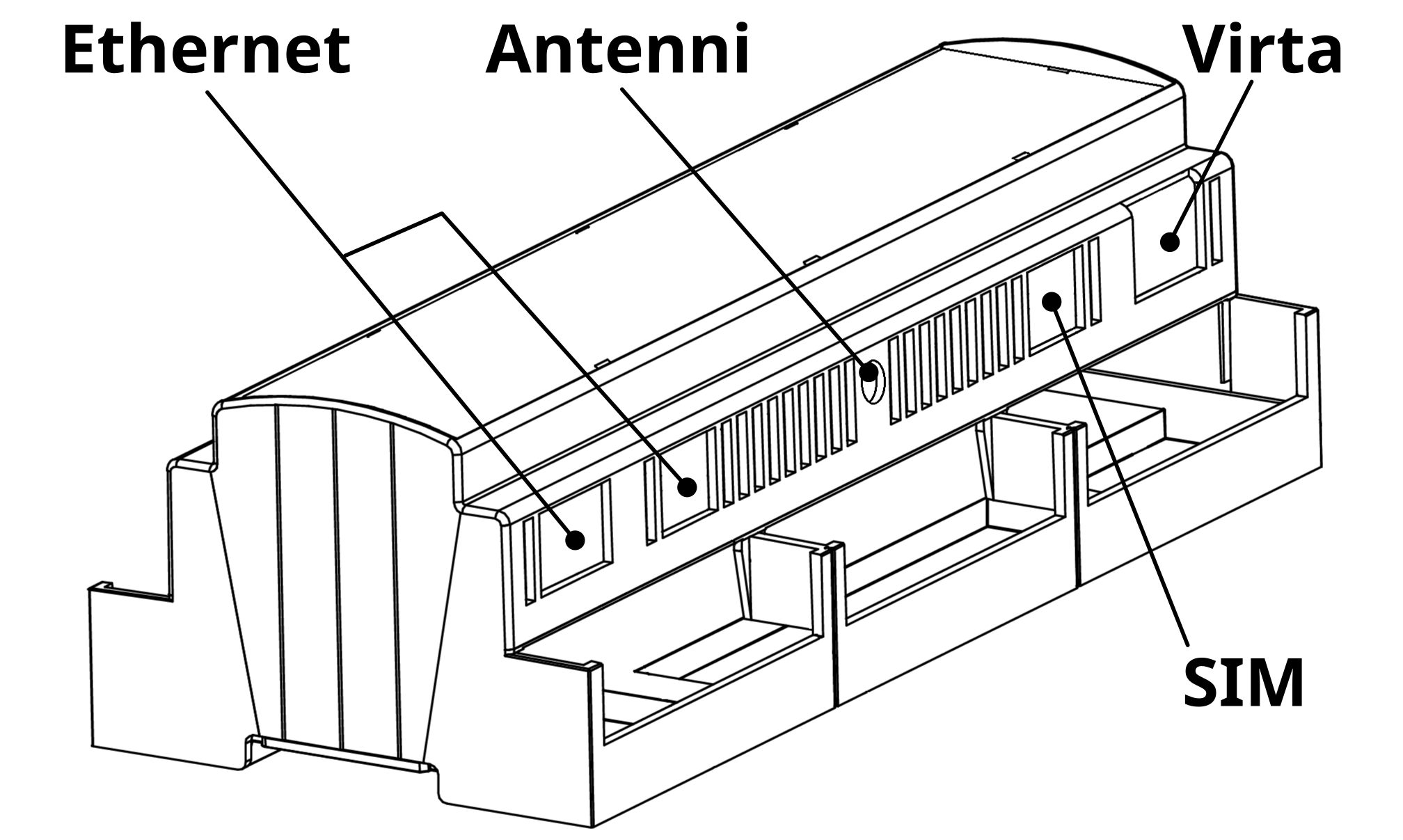
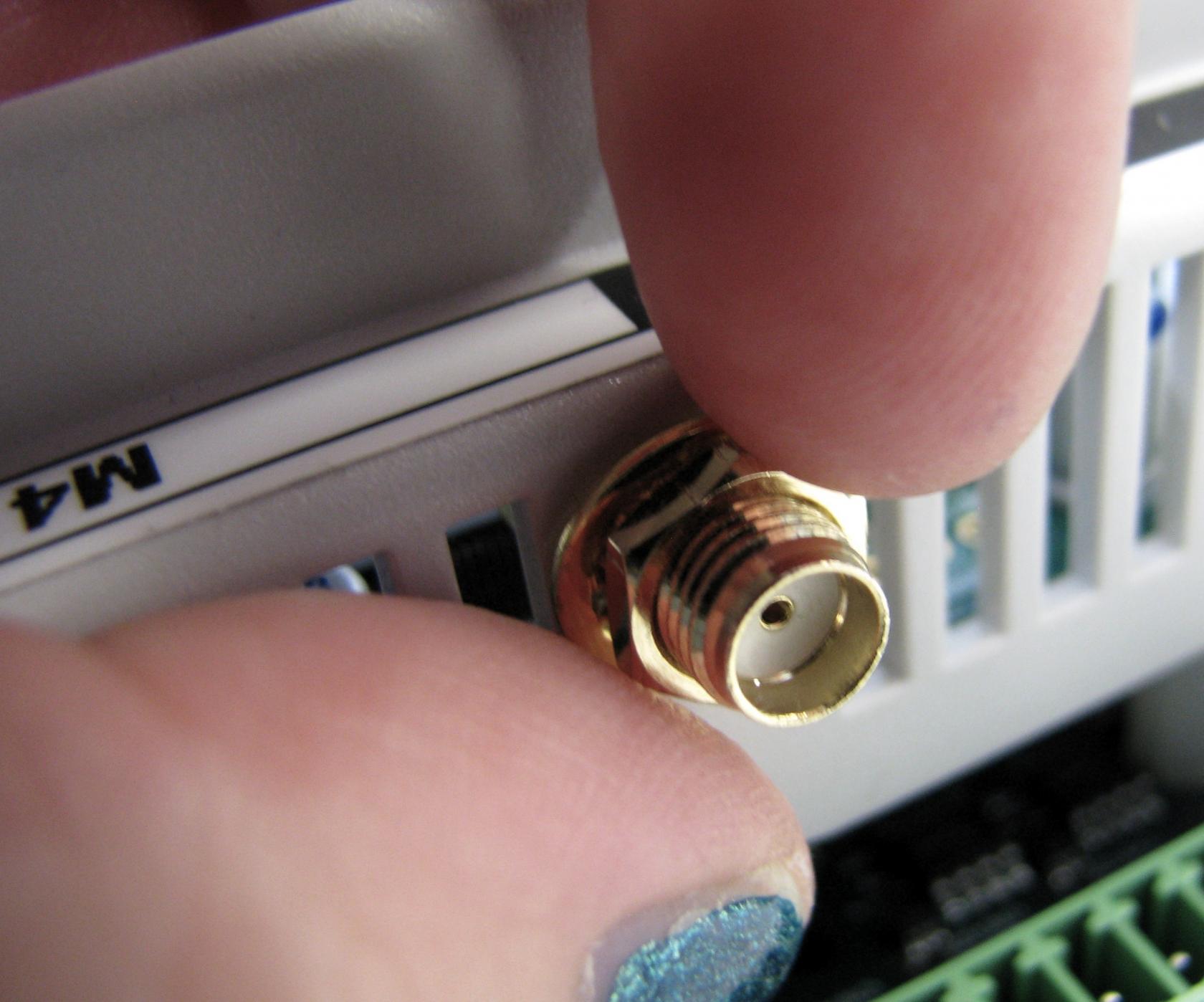
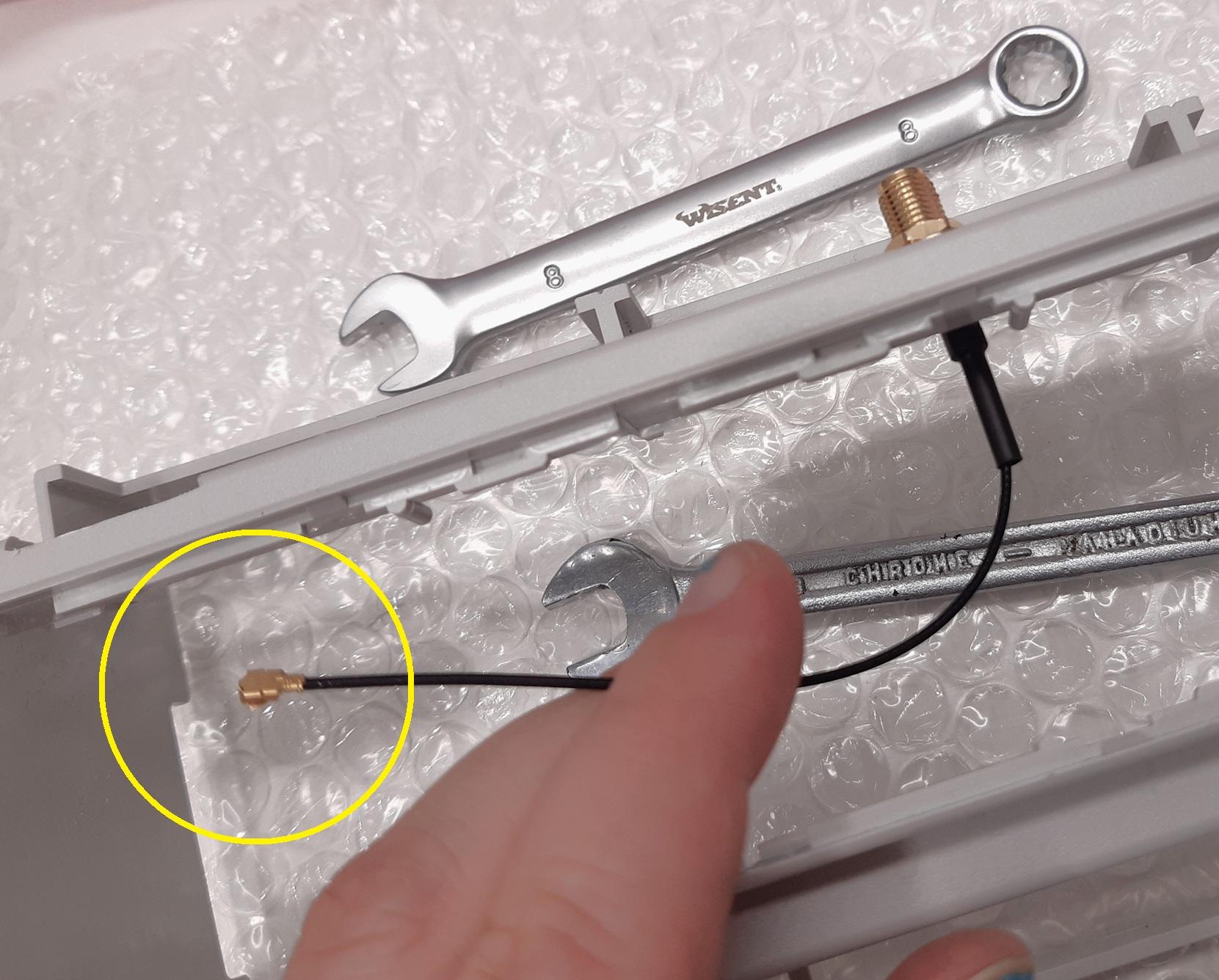
- Kiinnitä 4G-antenni kotelon aukkoon mutterilla. Kiristämiseen tarvit kaksi 8mm avainta.

<p class="callout info">Huom! Kiristysvaiheessa kiinnitä huomiota siihen, miten päin antennin liitin on kaapelin päässä. Kiristä antennin kaapeli siihen asentoon, että se on helppo painaa modeemin M-liittimeen.</p>

**![kotelo-ja-kansi-selitteet.png](https://wiki.bithouse.fi/uploads/images/gallery/2025-08/scaled-1680-/kotelo-ja-kansi-selitteet.png)![antenni kiinni koteloon.JPG](https://wiki.bithouse.fi/uploads/images/gallery/2025-08/scaled-1680-/antenni-kiinni-koteloon.JPG)**

![antenni koteloon.jpg](https://wiki.bithouse.fi/uploads/images/gallery/2025-09/scaled-1680-/Q6xantenni-koteloon.jpg)

</details>#### 4.3 <span style="color: rgb(251, 238, 184); background-color: rgb(185, 106, 217);">Laite koteloon</span>


<details id="bkmrk-4.3.1-laitteen-asett"><summary></summary>

##### 2.3.1 Laitteen asettaminen koteloon

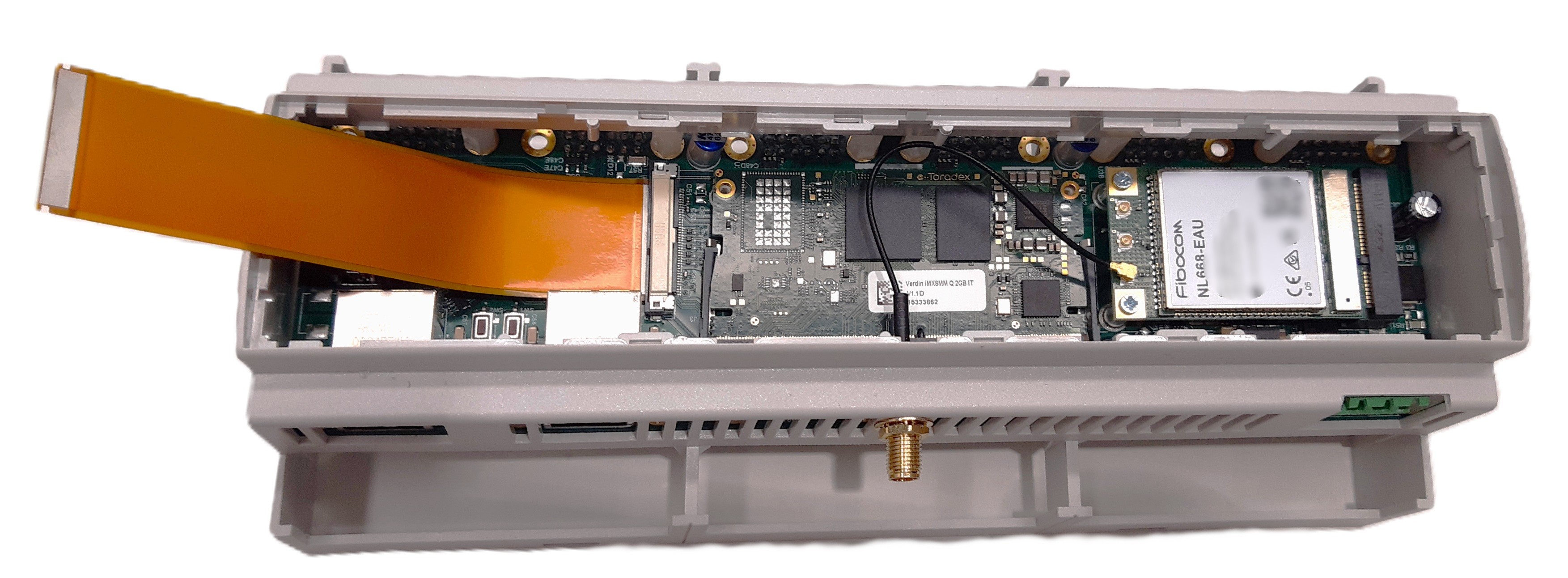
- Aseta valmis kortti koteloon. Varmista, että antennikaapeli ei jää mihinkään väliin.

<span style="background-color: rgb(185, 106, 217); color: rgb(251, 238, 184);">kuva</span>

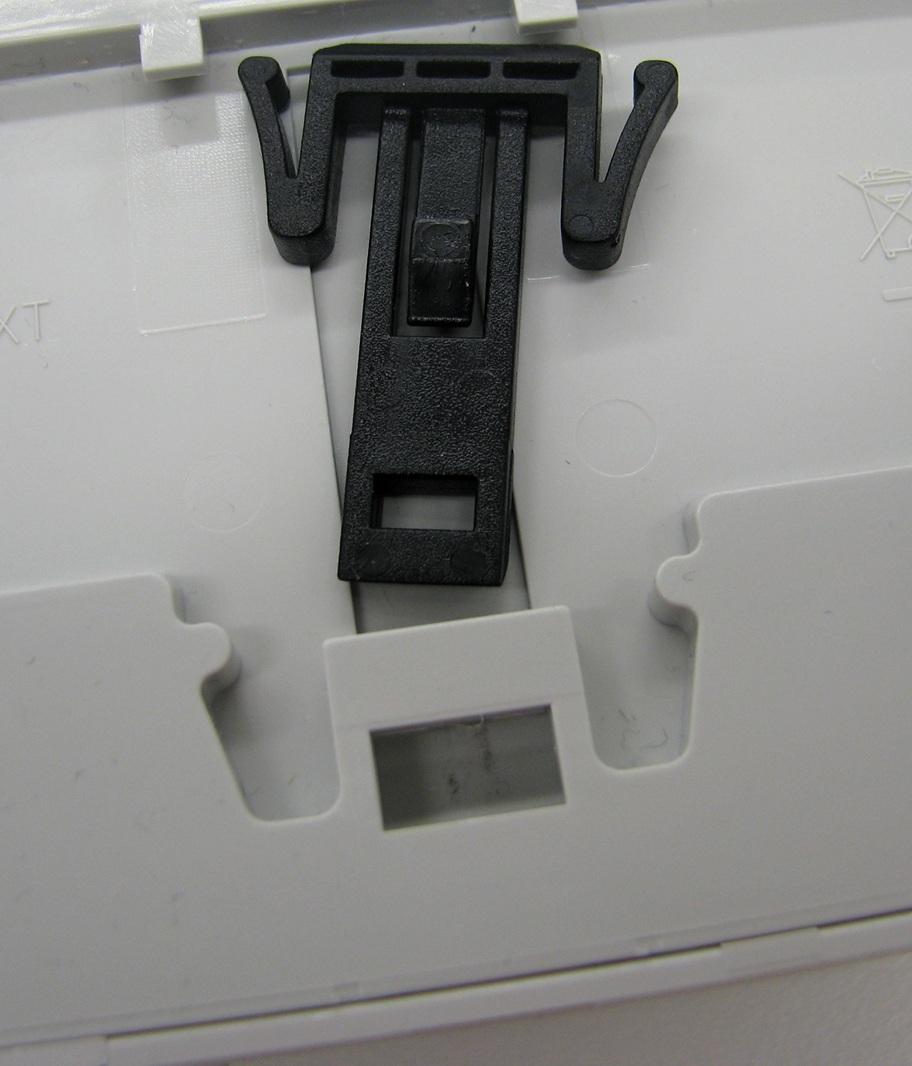
- Aseta kotelon pohja paikalleen. Muista laittaa kiskoklipsit paikoilleen.
![kiskoklipsi1.jpg](https://wiki.bithouse.fi/uploads/images/gallery/2026-03/scaled-1680-/kiskoklipsi1.jpg)

##### <span style="background-color: rgb(191, 237, 210);">4.3.2 Modeemin antennin kytkeminen modeemiin (tarvittaessa)</span>

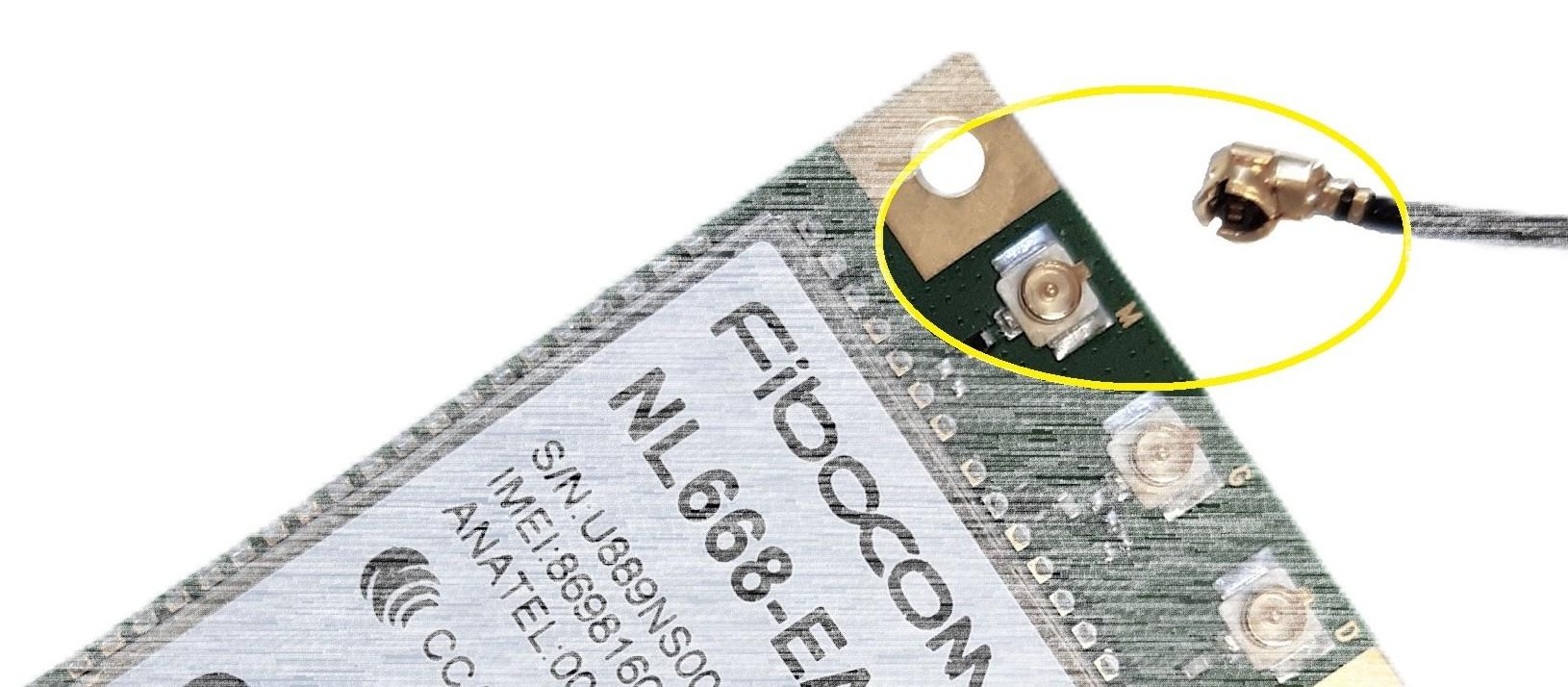
- Kytke antenni modeemin **M-liittimeen** napakasti painamalla.

### ![kytke_antennipiuha_modeemiin.jpg](https://wiki.bithouse.fi/uploads/images/gallery/2025-04/scaled-1680-/pBAkytke-antennipiuha-modeemiin.jpg)
![https://wiki.bithouse.fi/uploads/images/gallery/2026-02/pienkansiaukiblur.jpg](https://wiki.bithouse.fi/uploads/images/gallery/2026-02/pienkansiaukiblur.jpg)

</details></details>### 3. moduulien Ohjelmointi 

- Ensin menee osoitteeseen **192.168.10.134**  ja varmistaa ettei muuuta laitettaa ole pyörimässä siinä osoitteessä. 
    - Jos muita laitteita ei ole, selainikkuna valittaa time-outista
    - Jos muita laitteita on, ilmestyy kirjautumisikkuna. Tässä saattaa olla myös kyse siitä, että jotain on jäänyt selaimen välimuistiin - muista päivittää ikkuna varmistaaksesi asian.

 Jos ei ole jatka seuraavasti:


<details id="bkmrk-5.1-valmistelut-5.1."><summary></summary>

#### 3.1 Valmistelut


<details id="bkmrk-5.1.1-kytkenn%C3%A4t-kytk"><summary></summary>

[![PIENdevice-setup-setup.jpg](https://wiki.bithouse.fi/uploads/images/gallery/2026-02/scaled-1680-/piendevice-setup-setup.jpg)](https://wiki.bithouse.fi/uploads/images/gallery/2026-02/piendevice-setup-setup.jpg)


##### 3.1.1 Kytkennät

- Kytke virtajohdin virtaliittimestä pistorasiaan. Eth1-porttiin syttyy oranssi valo. **Odota**, että valo sammuu.
- Kytke Ethernet-kaapeli Eth1-portista seinän J10-porttiin.

[![kytke_integral03.jpg](https://wiki.bithouse.fi/uploads/images/gallery/2026-04/scaled-1680-/kytke-integral03.jpg)](https://wiki.bithouse.fi/uploads/images/gallery/2026-04/kytke-integral03.jpg)

##### 3.1.2 Selainikkunan avaaminen

- Linux-koneelta: 
    - [![Workbench-server-icon.png](https://wiki.bithouse.fi/uploads/images/gallery/2026-02/scaled-1680-/workbench-server-icon.png)](https://wiki.bithouse.fi/uploads/images/gallery/2026-02/workbench-server-icon.png) Käynnistä Integral Workbench Server (mustavihreä ikoni). Avautuu teksti-ikkuna.
    - [![Workbench-user-mode-icon.png](https://wiki.bithouse.fi/uploads/images/gallery/2026-02/scaled-1680-/workbench-user-mode-icon.png)](https://wiki.bithouse.fi/uploads/images/gallery/2026-02/workbench-user-mode-icon.png) Käynnistä Workbench user mode (turkoosi vasara). Avautuu selainikkuna.

[![mainmenu.png](https://wiki.bithouse.fi/uploads/images/gallery/2026-04/scaled-1680-/mainmenu.png)](https://wiki.bithouse.fi/uploads/images/gallery/2026-04/mainmenu.png)

</details><p class="callout success">Olet nyt Integral testbenchin Main menussa, ja Integral on kytketty koneeseen.</p>

#### <span style="background-color: rgb(194, 224, 244);">3.2 Moduulien ohjelmointi</span>

<details id="bkmrk-ensin-ohjelmoidaan-m"><summary></summary>

Ensin ohjelmoidaan moduulit:

[![mainmenu-moduleprogramming.png](https://wiki.bithouse.fi/uploads/images/gallery/2026-04/scaled-1680-/mainmenu-moduleprogramming.png)](https://wiki.bithouse.fi/uploads/images/gallery/2026-04/mainmenu-moduleprogramming.png)

- Klikkaa **Run**

**[![module-programming-2.png](https://wiki.bithouse.fi/uploads/images/gallery/2026-02/scaled-1680-/module-programming-2.png)](https://wiki.bithouse.fi/uploads/images/gallery/2026-02/module-programming-2.png)**

- Valitse Integral-moduulit alasvetovalikosta kuhunkin moduulipaikkaan.

<p class="callout warning">Huomioi moduulipaikkojen järjestys! Moduulipaikka 1 on virtaliittimen puoleisessa päädyssä.</p>

[![module-programming-3 - rajattu.png](https://wiki.bithouse.fi/uploads/images/gallery/2026-03/scaled-1680-/module-programming-3-rajattu.png)](https://wiki.bithouse.fi/uploads/images/gallery/2026-03/module-programming-3-rajattu.png) [![moduulipaikat-simple.png](https://wiki.bithouse.fi/uploads/images/gallery/2026-03/scaled-1680-/moduulipaikat-simple.png)](https://wiki.bithouse.fi/uploads/images/gallery/2026-03/moduulipaikat-simple.png)

- <span style="color: rgb(236, 240, 241);">**<span style="background-color: rgb(224, 62, 45);">Huom! USB-C-4P-moduulin ohjelmointi on poikkeuksellinen, ja sen ohjelmointia varten valitse None toistaiseksi!</span>**</span>
- Klikkaa **Confirm**

Ohjelma hakee Dropboxista uusimmat firmwaret ja asentaa ne vastaaviin moduuleihin. Lisäksi ohjelma luo laitteelle sarjanumeron.

[![module-programming-4.png](https://wiki.bithouse.fi/uploads/images/gallery/2026-02/scaled-1680-/module-programming-4.png)](https://wiki.bithouse.fi/uploads/images/gallery/2026-02/module-programming-4.png)

- Klikkaa **Back to home screen**

### **[![module-programming-5.png](https://wiki.bithouse.fi/uploads/images/gallery/2026-02/scaled-1680-/module-programming-5.png)](https://wiki.bithouse.fi/uploads/images/gallery/2026-02/module-programming-5.png)**

##### 3.2.1 Moduulien uudelleenohjelmointi

Jos joudut ohjelmoimaan moduulit uudestaan, paina im-programming -ikkunassa RESET, ja suorita samat vaiheet kuin ensimmäiselläkin kerralla.

</details>
</details>#### 4. Device setup **<span style="color: rgb(251, 238, 184); background-color: rgb(185, 106, 217);">\[=\]</span>**


<details id="bkmrk-seuraavaksi-konfigur"><summary></summary>


Jos integraalin moduulit on jo aikaisemmin on ohjelmoitu, ja nyt haluaisit tehdä DEVICE SETUP, sähköön ja verkkoon kytkimsen jälkeen odottaa 3 mins että laite herää!  
Seuraavaksi konfiguroidaan käyttöjärjestelmä:

[![mainmenu-operatingsystemsetup.png](https://wiki.bithouse.fi/uploads/images/gallery/2026-04/scaled-1680-/mainmenu-operatingsystemsetup.png)](https://wiki.bithouse.fi/uploads/images/gallery/2026-04/mainmenu-operatingsystemsetup.png)

- Klikkaa **Run**

**[![operating-system-setup-2.png](https://wiki.bithouse.fi/uploads/images/gallery/2026-02/scaled-1680-/operating-system-setup-2.png)](https://wiki.bithouse.fi/uploads/images/gallery/2026-02/operating-system-setup-2.png)**

Ohjelma konfiguroi käyttöjärjestelmän. Tämä on monivaiheinen toimenpide, jossa voi kestää 7-8 minuuttia. Eth1-portin vilkkuva oranssi valo kertoo, että toimenpide on edelleen käynnissä.

Toimenpide sisältää seuraavat asiat:

- - MAC-osoitteen asettaminen Eth2-portille
    - Actiweb-ohjelmistoalustan ja siihen liittyvien pakettien asentaminen
    - Palomuurin konfigurointi
    - Kernelin watchdog-ajastimen setup
    - Käyttöliittymän salasanan vaihtaminen
    - Sarjanumeron ym. tallentaminen CSV-tiedostoon

[![operating-system-setup-31.png](https://wiki.bithouse.fi/uploads/images/gallery/2026-02/scaled-1680-/operating-system-setup-31.png)](https://wiki.bithouse.fi/uploads/images/gallery/2026-02/operating-system-setup-31.png)


<p class="callout info">Setup kestää noin 7-8 min. Jos työvaihe on tuttu, voit tehdä esimerkiksi näytön lisäkortin kytkennän tai liittimien tarrojen liimailua tässä kohtaa.</p>

##### 4.1 Operating system setup uudelleen**<span style="color: rgb(251, 238, 184); background-color: rgb(185, 106, 217);">\[=\]</span>**


<details><summary></summary>

**Operating system setup** ‑toimintoa ei voi suorittaa useita kertoja peräkkäin, koska toiminto vaihtaa laitteelle uuden salasanan. Seuraavalla yrityksellä toiminto yrittää kirjautua Integraliin vanhalla salasanalla, mikä estää toiminnon onnistumisen.

Toimi seuraavasti:

- Kytke Integral irti piuhoista.
- Tee tilaa CPU-SoM-kortin irrotusta varten 
    - Irrota antennipiuha modeemista + irrota virtaliitin + ota Integral ulos kotelosta.
    - <span style="background-color: rgb(251, 238, 184);">**TAI**</span>
    - Ruuvaa antennipiuha irti kotelosta (tämä on hankalampi kiristää kunnolla takaisin laitettaessa, mutta on vähemmän vaiheita).
- Irrota CPU-SoM Integralin pääkortista.
- Tee tämän ohjeen kohta 3.3: **Prosessorimoduulin (CPU-SoM) uudelleenohjelmointi.** <span style="background-color: rgb(251, 238, 184);"><span style="background-color: rgb(185, 106, 217); color: rgb(251, 238, 184);">\[linkki tähän\]</span></span>
- Aseta CPU-SoM takaisin Integralin pääkorttiin (liitä takaisin virtaliitin jos olet irrottanut sen 2-kohdassa).
- Tee tämän ohjeen kohta 5.1. - 5.1.2: **Valmistelu.** <span style="background-color: rgb(251, 238, 184);"><span style="background-color: rgb(185, 106, 217); color: rgb(251, 238, 184);">\[linkki tähän\]</span></span>
- Tee tämän ohjeen kohta 5.4: **Device setup.<span style="background-color: rgb(251, 238, 184);"><span style="background-color: rgb(185, 106, 217); color: rgb(251, 238, 184);">\[linkki tähän\]</span></span>**
- Kokoa takaisin aiemmin purkamasi osat.

<p class="callout info">Uudelleen konfiguroidessa toiminto ilmoittaa virheestä: source already added. Tämä kuuluu asiaan.</p>

<p class="callout warning">HUOM! Jos yrittää tehdä **Operating system setup** -toiminnon väärällä salasanalla, laite lukitsee turvallisuussyistä itsensä määräajaksi.</p>

- Mene kahville.

</details></details>
- Lopuksi tarkistetaan että tiedot ovat tallentuneet **Produced\_devices.CSV** -tiedostoon (sijaitsee actiweb-käyttäjän kotihakemistossa):

1. Sarjanumero 
    - - On muotoa \[vuosiluku\]\[kuukausi\]\[päivä\]\[juokseva numero 5 merkkiä\], esim. 2026081500345
2. ID 
    - - On \[lisää tämä myöh\]
3. Admin-salasana
4. Linux-salasana
5. Päivämäärä
6. Eth2 portin MAC-osoite

#### <span style="background-color: rgb(194, 224, 244);">5. Testaukset (niille moduuleille joita laitteessa on) </span>**<span style="color: rgb(251, 238, 184); background-color: rgb(185, 106, 217);">\[=\]</span>**

Sitten testataan moduulit. Testataan ne moduulit, joita laitteeseen on asennettu

##### <span style="background-color: rgb(194, 224, 244);">5.1 IM-IO816</span>

Tulossa

##### <span style="background-color: rgb(194, 224, 244);">5.2 IM-RS485-2P (modbus)</span>

- Kytke IM-RS485-2P -moduulin liittimeen \[se juttu mikä näkyy kuvassa\]

<span style="background-color: rgb(185, 106, 217); color: rgb(251, 238, 184);"><span style="background-color: rgb(185, 106, 217); color: rgb(251, 238, 184);">\[TÄHÄN KUVA MODBUS-Testiliitynnästä\]</span></span>

<span style="background-color: rgb(185, 106, 217); color: rgb(251, 238, 184);">[![mainmenu-modbustest.png](https://wiki.bithouse.fi/uploads/images/gallery/2026-04/scaled-1680-/mainmenu-modbustest.png)](https://wiki.bithouse.fi/uploads/images/gallery/2026-04/mainmenu-modbustest.png)</span>

- Valitse Modbus-testi.

<span style="background-color: rgb(185, 106, 217); color: rgb(251, 238, 184);"><span style="background-color: rgb(185, 106, 217); color: rgb(251, 238, 184);">\[TÄHÄN KUVA MODBUS-TESTAUSVALIKOSTA\]</span></span>

- Klikkaa **Run**.

##### <span style="background-color: rgb(194, 224, 244);">5.3 IM-MBUS-10/250</span>

- Kytke IM-MBUS-10 tai IM-MBUS-250 mittariin, joka on testausta varten kokoamispisteellä.

<span style="background-color: rgb(185, 106, 217); color: rgb(251, 238, 184);"><span style="background-color: rgb(185, 106, 217); color: rgb(251, 238, 184);">\[TÄHÄN KUVA MBUS-Testiliitynnästä\]</span></span>

<span style="background-color: rgb(185, 106, 217); color: rgb(251, 238, 184);">[![mainmenu-mbustest.png](https://wiki.bithouse.fi/uploads/images/gallery/2026-04/scaled-1680-/mainmenu-mbustest.png)](https://wiki.bithouse.fi/uploads/images/gallery/2026-04/mainmenu-mbustest.png)</span>

- Valitse Mbus-testi.

<span style="background-color: rgb(185, 106, 217); color: rgb(251, 238, 184);"><span style="background-color: rgb(185, 106, 217); color: rgb(251, 238, 184);">\[TÄHÄN KUVA MBUS-TESTAUSVALIKOSTA\]</span></span>

- Klikkaa **Run**.

##### <span style="background-color: rgb(194, 224, 244);">5.4 IM-USB-C-4P</span>

- Terminaali auki (ctrl-alt-t)
- ssh actiweb@192.168.10.134
- ei mitään kiini im-usb-4c:ssä
- lsusb -&gt; näyttää kaikki laitteet
- Kiinitetään USB-tikku/-tikut
- lsusb -&gt; näyttää 1/2/3/4 uutta riviä
- tikku/tikut irti
- lsusb -&gt; ei näytä tikkua/tikkuja

####  6. <span class="font-outfit text-xl font-bold my-auto">Bithouse Production Database:</span>

<details id="bkmrk-production-database-"><summary></summary>

Production database (osoitteessa 192.168.0.201) ja sisäänkirjautuminen; tarvitset omat tunnukset.

<span class="font-outfit text-xl font-bold my-auto">Tässä vaiheessa syötä laitteen tiedot Tässä vaiheessa syötä laitteen tiedot tuotantotietokantaan.  
Voit tutustua siihen tästä:</span><span class="font-outfit text-xl font-bold my-auto"> [https://wiki.bithouse.fi/books/bithouse-production-database](https://wiki.bithouse.fi/books/bithouse-production-database)</span>

<span class="font-outfit text-xl font-bold my-auto">Muista Integralin seuraavat tiedot on </span>

- SERIAL BASE (pakollinen)
- SERIAL ENDING(pakollinen)
- SERIAL NUMNER (SERIAL BASE+SERIAL ENDING)(pakollinen)
- DEVICE ID QR (pakollinen)
- ACTIWEB PASS (pakollinen)
- SYSTEM PASS (pakollinen)
- PCB (pakollinen)
- MAC1 (pakollinen)
- CUSTOMER (Jos tiedossa!)
- SITE (Jos tiedossa!)
- NOTE (Jos tiedossa!)

</details>### 7. Näyttö tai kansi


<details id="bkmrk-6.a-laite%2C-jossa-n%C3%A4y"><summary></summary>

#### <span style="background-color: rgb(236, 202, 250);">7.1Laite, jossa näyttö</span>

<details id="bkmrk-6.a.1-n%C3%A4yt%C3%B6n-lis%C3%A4kor"><summary></summary>


##### <span style="background-color: rgb(236, 202, 250);">6.a.2 Lattakaapelin kytkentä</span>

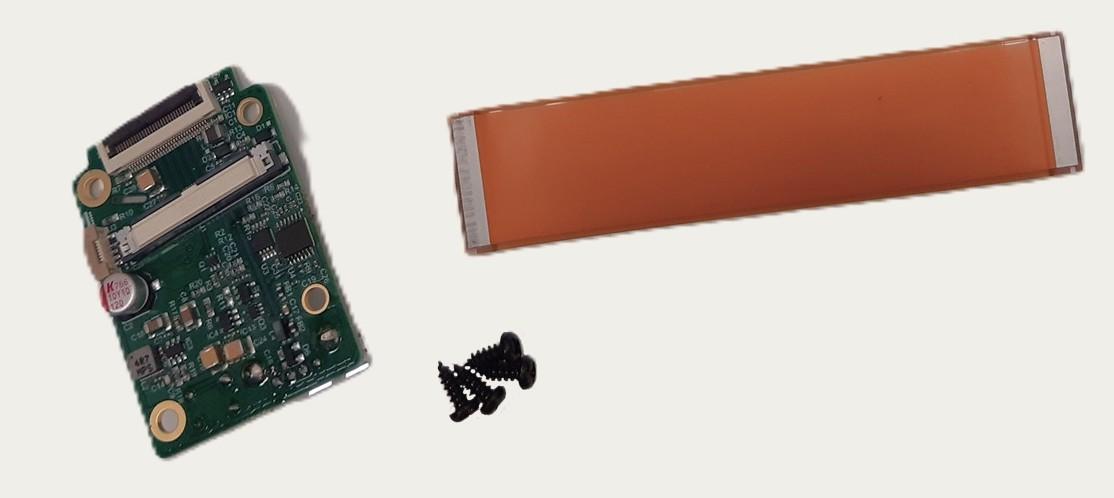
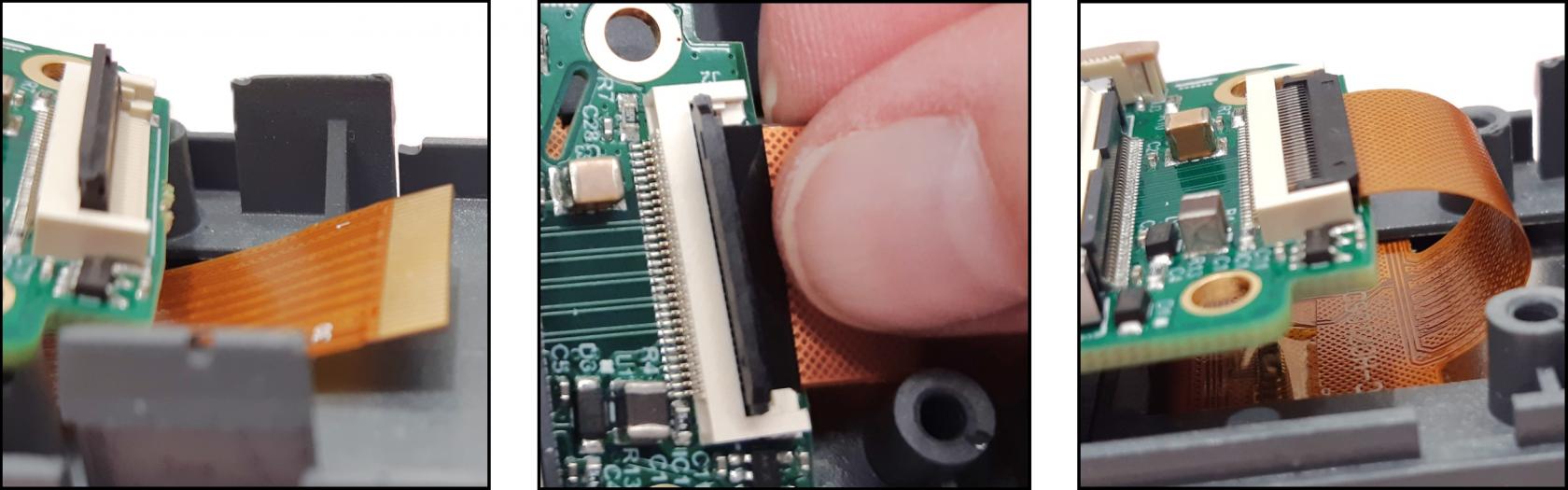
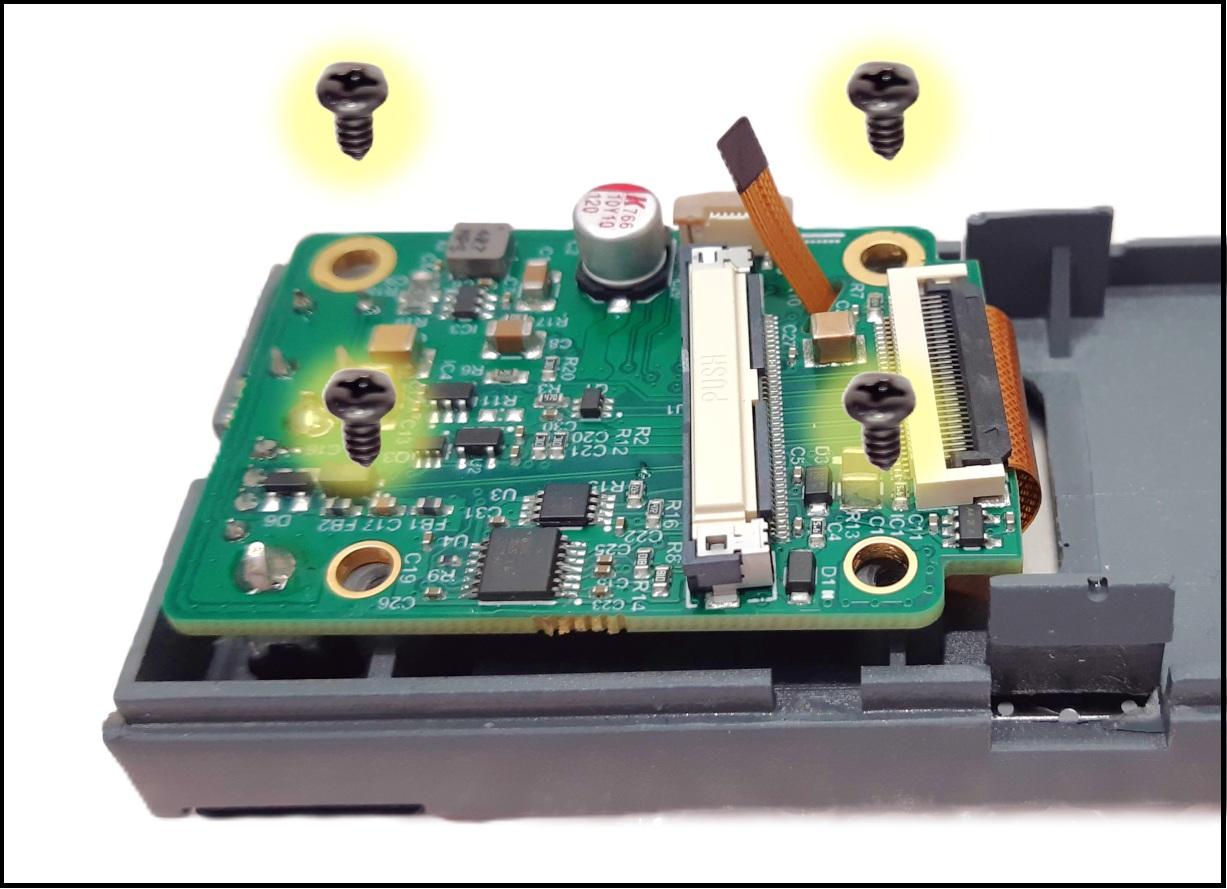
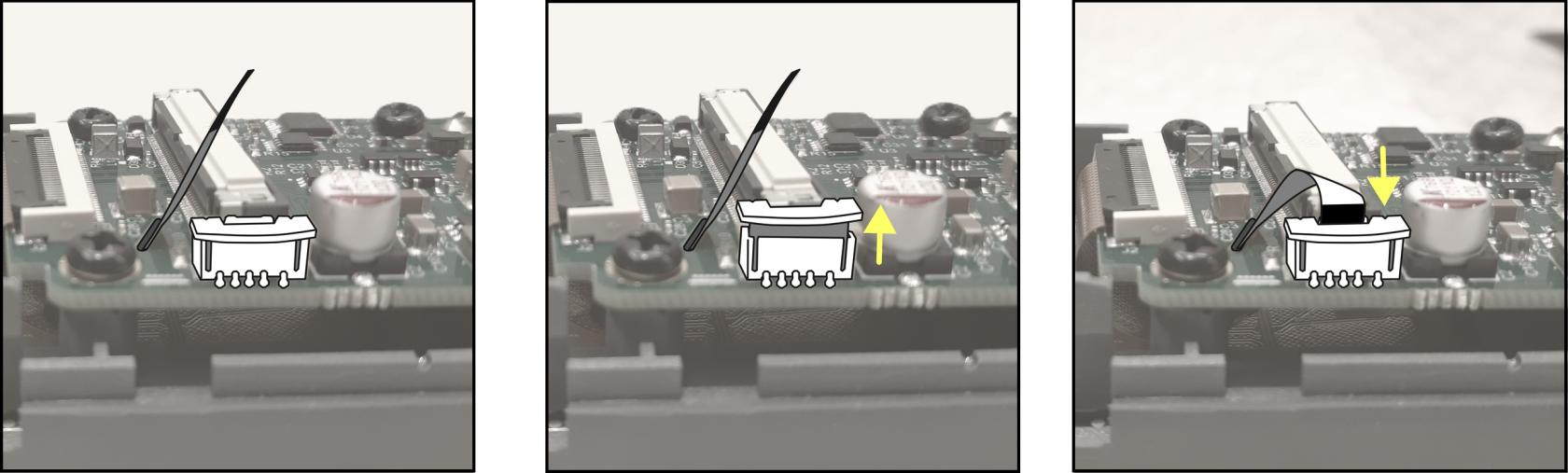
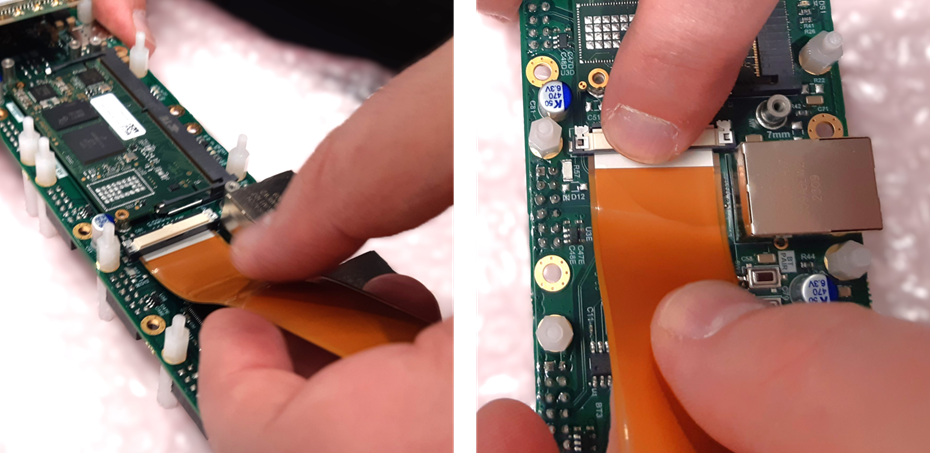
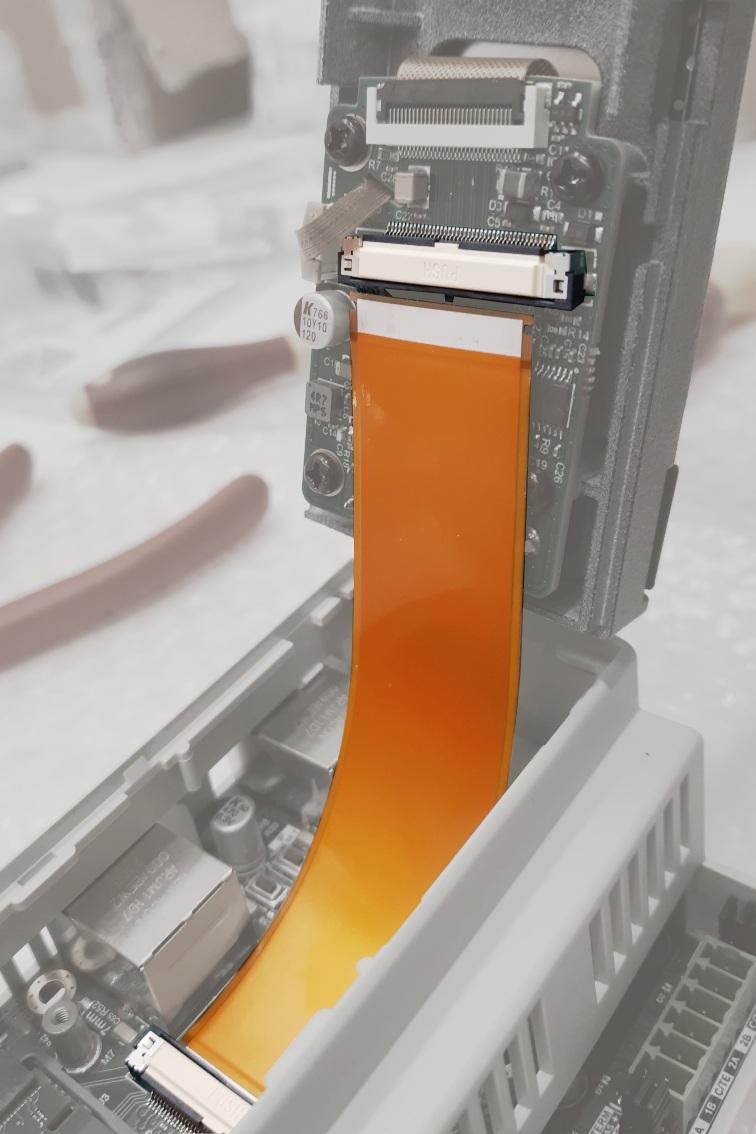
- <span style="color: rgb(52, 73, 94);">Kytke lattakaapeli näytön lisäkorttiin. Tämä vaatii hieman sorminäppäryyttä, taasen ne molempien reunojen napsahdukset paikoilleen.</span>

[![lattakaapeli_lisäkorttiin.jpg](https://wiki.bithouse.fi/uploads/images/gallery/2026-04/scaled-1680-/lattakaapeli-lisakorttiin.jpg)](https://wiki.bithouse.fi/uploads/images/gallery/2026-04/lattakaapeli-lisakorttiin.jpg)

##### <span style="background-color: rgb(236, 202, 250);">6.a.3 Näytön liittäminen koteloon</span>

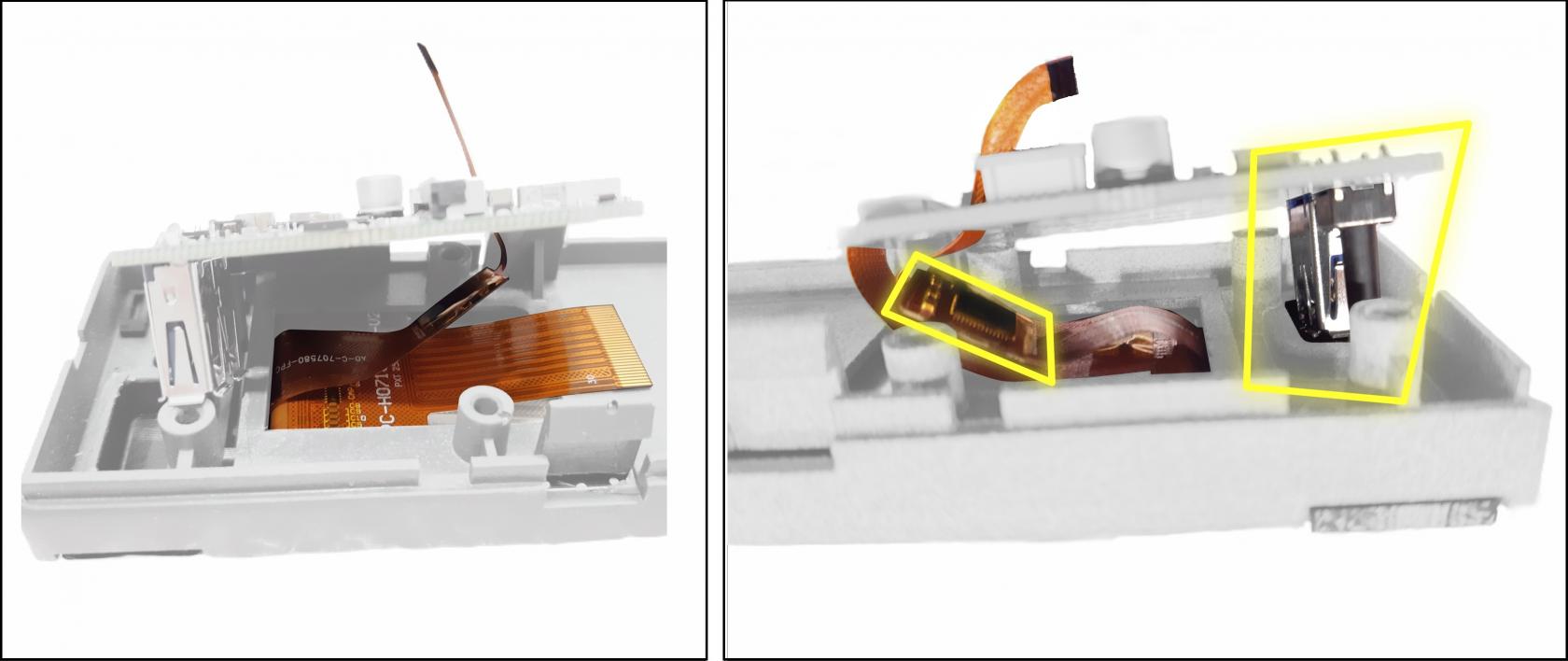
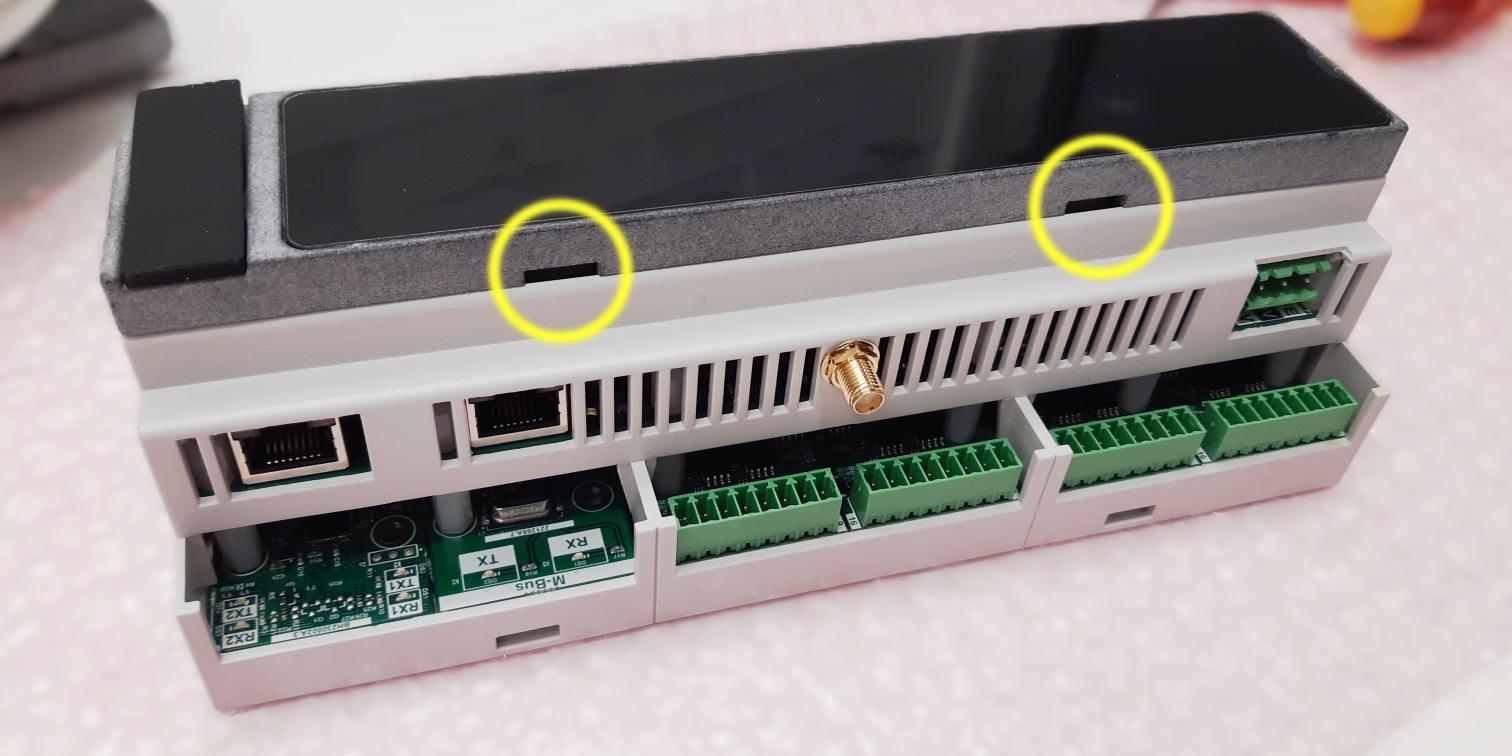
Napsauta näyttö kiinni koteloon. Kiinnitä huomiota, että kaikki väkäset napsahtavat kunnolla kiinni.

[![näyttö-paikalleen.jpg](https://wiki.bithouse.fi/uploads/images/gallery/2026-03/scaled-1680-/naytto-paikalleen.jpg)](https://wiki.bithouse.fi/uploads/images/gallery/2026-03/naytto-paikalleen.jpg)

</details>#### 7.2 Laite, jossa kansi

<details id="bkmrk-liimaa-kanteen-kansi"><summary></summary>

- Liimaa kanteen kansitarra.
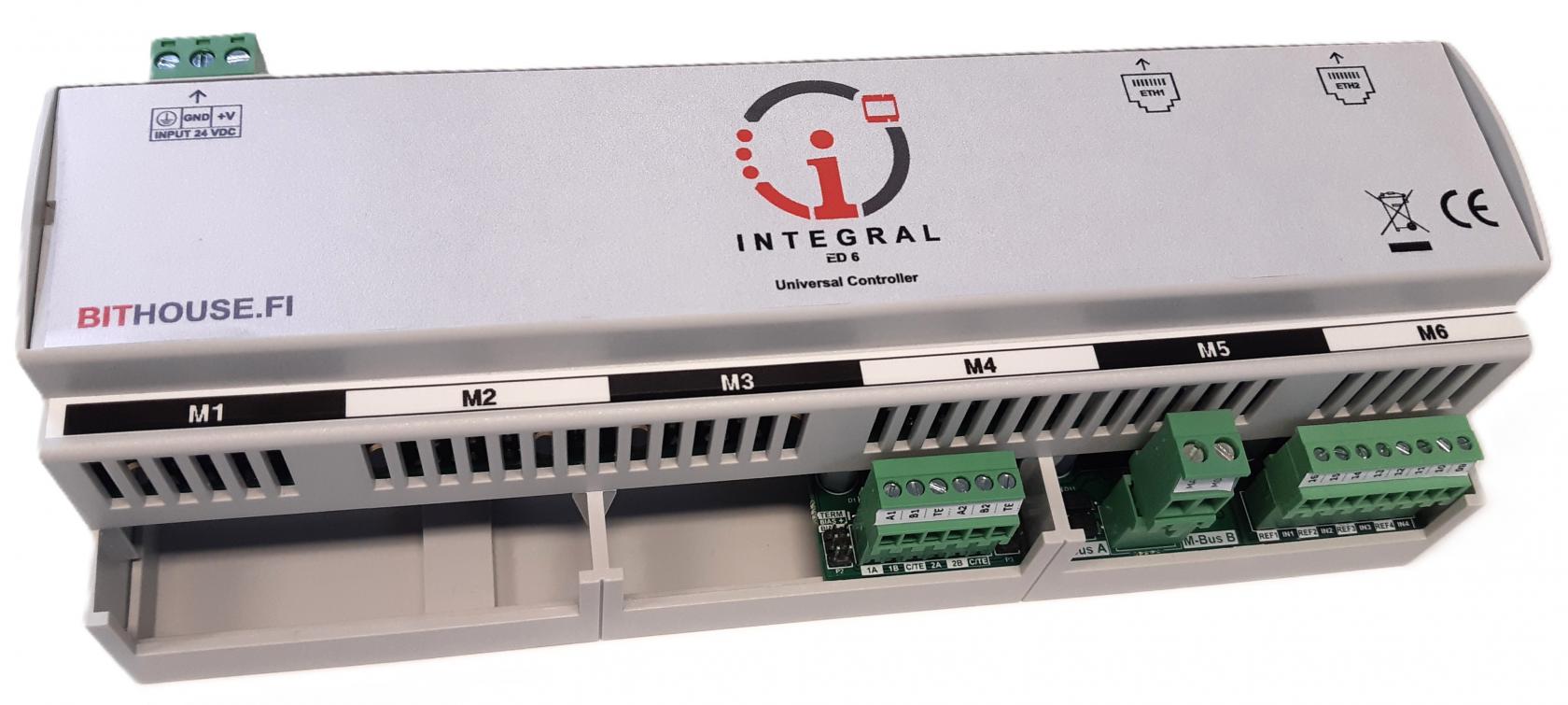
- Napsauta kansi paikoilleen. Huomioi, että kansi osoittaa liityntäpisteet oikein (Virtaliitin, Ethernet-liittimet).![tarrat-kansi.jpg](https://wiki.bithouse.fi/uploads/images/gallery/2025-04/scaled-1680-/tarrat-kansi.jpg)

</details></details>### 8. Liittimet ja tarrat


<details id="bkmrk-7.1-kotelon-tarrat-7"><summary></summary>

#### 7.1 Kotelon tarrat


<details id="bkmrk-7.1.1-moduulipaikkoj"><summary></summary>

##### 7.1.1 Moduulipaikkoja osoittavat tarrat

- Liimaa tarrat 
    - Moduulipaikkoja osoittavat tarrat kannen/näytön molemmin puolin. Huomioi, että tarra osoittaa moduulipaikat oikeinpäin

[![moduulipaikat.png](https://wiki.bithouse.fi/uploads/images/gallery/2026-04/scaled-1680-/moduulipaikat.png)](https://wiki.bithouse.fi/uploads/images/gallery/2026-04/moduulipaikat.png)


##### <span style="background-color: rgb(236, 202, 250);">7.1.2.a Ethernet-portteja ja virtaliittimen liityntäpisteitä osoittava tarra</span>

- Vain näytöllisiin laitteisiin
- Liimaa tarra osoittamaan Ethernet-portit ja virtaliittimen liityntäpisteet.

[![eth_ja_pwr.png](https://wiki.bithouse.fi/uploads/images/gallery/2026-04/scaled-1680-/eth-ja-pwr.png)](https://wiki.bithouse.fi/uploads/images/gallery/2026-04/eth-ja-pwr.png)

</details>#### 7.2 Liittimet


<details id="bkmrk-7.2.1-moduulien-liit"><summary></summary>

##### <span style="background-color: rgb(194, 224, 244);">7.2.1 Moduulien liittimet merkintöineen</span>

<table border="1" id="bkmrk-liitin-moduulin-muka" style="border-collapse: collapse; width: 69.7138%;"><colgroup><col style="width: 33.1909%;"></col><col style="width: 66.7507%;"></col></colgroup><thead><tr><td>**Liitin moduulin mukaan**</td><td>**Kuva tarran asettelusta**</td></tr></thead><tbody><tr><td>IM-IO816 / 1...8</td><td>[![01_08.jpg](https://wiki.bithouse.fi/uploads/images/gallery/2026-04/scaled-1680-/01-08.jpg)](https://wiki.bithouse.fi/uploads/images/gallery/2026-04/01-08.jpg)</td></tr><tr><td>IM-IO816 / 9...16</td><td>[![09_16.jpg](https://wiki.bithouse.fi/uploads/images/gallery/2026-04/scaled-1680-/09-16.jpg)](https://wiki.bithouse.fi/uploads/images/gallery/2026-04/09-16.jpg)</td></tr><tr><td>IM-MBUS-10/250</td><td>[![mbus_new.png](https://wiki.bithouse.fi/uploads/images/gallery/2026-04/scaled-1680-/mbus-new.png)](https://wiki.bithouse.fi/uploads/images/gallery/2026-04/mbus-new.png)</td></tr><tr><td>IM-RS485-2P</td><td>[![rs485.jpg](https://wiki.bithouse.fi/uploads/images/gallery/2026-04/scaled-1680-/rs485.jpg)](https://wiki.bithouse.fi/uploads/images/gallery/2026-04/rs485.jpg)</td></tr><tr><td>IM-USB-C-4P</td><td>  
</td></tr></tbody></table>

##### 7.2.2 Virtaliitin merkintöineen

[![PWR.png](https://wiki.bithouse.fi/uploads/images/gallery/2026-04/scaled-1680-/pwr.png)](https://wiki.bithouse.fi/uploads/images/gallery/2026-04/pwr.png)


##### 7.2.3 Tarkistuskuvat

<p class="callout warning">Tarkista huolellisesti, että tarrat osoittavat liityntäpisteiden symbolit/numerot oikein.</p>

- **IM-IO816**-moduulin liityntäpisteet menevät aina korttiin merkityn järjestyksen mukaan, mutta kortin versiosta riippuen merkinnät saattavat olla selkeämpiä tai vähemmän helppolukuisia. Mikäli kortille on merkitty esim. 51-58, ne ovat vastaavasti liityntäpisteet 01-08 (kts. kuva)

[![liitinmerkinnätIO816 -lähikuva.jpg](https://wiki.bithouse.fi/uploads/images/gallery/2025-09/scaled-1680-/liitinmerkinnatio816-lahikuva.jpg)](https://wiki.bithouse.fi/uploads/images/gallery/2025-09/liitinmerkinnatio816-lahikuva.jpg)

<p class="callout warning">Tarkista, että kaikki tarrojen merkinnät ovat samoin päin.</p>

Jos joku merkintä on eri suuntaan luettava:

- Virtaliittimen tai kotelon tarra on vanhaa mallia
- Tarrat eivät osoita oikeita liityntäpisteitä

[![tarkistus-samasuunta.png](https://wiki.bithouse.fi/uploads/images/gallery/2026-04/scaled-1680-/tarkistus-samasuunta.png)](https://wiki.bithouse.fi/uploads/images/gallery/2026-04/tarkistus-samasuunta.png)

</details>#### 7.3 Sarjanumerotarra**<span style="color: rgb(251, 238, 184); background-color: rgb(185, 106, 217);">\[=\]</span>**


<details id="bkmrk-toistaiseksi%3A-kirjoi"><summary></summary>

Menee tietokantaan 192.168.0.201. Valitse laite ja tulosta tarra.  
Tarra on 24 mm:n musta teksti valkoisella tarralla.

[![image.png](https://wiki.bithouse.fi/uploads/images/gallery/2026-05/scaled-1680-/X0bimage.png)](https://wiki.bithouse.fi/uploads/images/gallery/2026-05/X0bimage.png)

</details></details>### 9. VPN

#### 9.1 VPN-excel

8.1.1 Avaa työpöydässä olevan VPN-excel tiedosto.

<p class="callout warning">Excelin soluja on lukittu eikä mitään virheitä lukuja voi tapahtua siihen.</p>

<p class="callout warning">Excelissä on kaksi punaista solua, johon pitäsisi kopioida kyseisen laitteen "Device ID".</p>

8.1.2 Avaa Produced\_devices.CSV -tiedosto (Actiweb-käyttäjän kotihakemistosta)

<table border="0" cellspacing="0" id="bkmrk-vpn-linkin-luonti-co"><colgroup width="83"></colgroup> <colgroup width="56"></colgroup> <colgroup width="41"></colgroup> <colgroup span="2" width="72"></colgroup> <colgroup width="204"></colgroup> <colgroup width="72"></colgroup> <colgroup width="53"></colgroup> <colgroup width="449"></colgroup><tbody><tr><td align="center" bgcolor="#FFFF00" colspan="9" data-sheets-value="{ "1": 2, "2": "VPN linkin luonti"}" height="37" rowspan="2" style="border: 2px solid #000000;" valign="middle">**<span style="color: #000000; font-size: x-large;">VPN linkin luonti</span>**</td></tr><tr></tr><tr><td align="center" bgcolor="#D9F2D0" colspan="3" data-sheets-value="{ "1": 2, "2": "common name"}" height="18" style="border: 2px solid #000000;" valign="bottom">**<span style="color: #000000;">common name</span>**</td><td align="center" bgcolor="#F2CFEE" colspan="3" data-sheets-value="{ "1": 2, "2": "url"}" style="border: 2px solid #000000;" valign="bottom">**<span style="color: #000000;">url</span>**</td><td align="center" bgcolor="#FBE3D6" colspan="2" data-sheets-value="{ "1": 2, "2": "customer"}" style="border: 2px solid #000000;" valign="bottom">**<span style="color: #000000;">customer</span>**</td><td align="center" bgcolor="#4E95D9" data-sheets-value="{ "1": 2, "2": "address"}" style="border-top: 2px solid #000000; border-bottom: 2px solid #000000; border-left: 2px solid #000000;" valign="bottom">**<span style="color: #000000;">address</span>**</td></tr><tr><td align="center" bgcolor="#FF3838" colspan="3" data-sheets-value="{ "1": 2, "2": "INSERT DEVICE ID"}" height="34" style="border-top: 2px solid #000000; border-bottom: 2px solid #000000; border-left: 2px solid #000000; border-right: 1px solid #000000;" valign="middle"><span style="color: #000000; font-family: Liberation Sans;">INSERT DEVICE ID</span></td><td align="center" bgcolor="#FF3838" colspan="3" data-sheets-value="{ "1": 2, "2": "INSERT DEVICE ID"}" style="border-top: 2px solid #000000; border-bottom: 2px solid #000000; border-left: 1px solid #000000; border-right: 1px solid #000000;" valign="middle"><span style="color: #000000; font-family: Liberation Sans;">INSERT DEVICE ID</span></td><td align="center" bgcolor="#FFFFFF" colspan="2" data-sheets-value="{ "1": 2, "2": "generic"}" style="border-top: 2px solid #000000; border-bottom: 2px solid #000000; border-left: 1px solid #000000; border-right: 1px solid #000000;" valign="middle"><span style="color: #000000; font-size: medium;">generic</span></td><td align="center" bgcolor="#FFFFFF" data-sheets-value="{ "1": 2, "2": ""}" style="border-top: 2px solid #000000; border-bottom: 2px solid #000000;" valign="middle"><span style="color: #000000; font-size: medium;">  
</span></td></tr><tr><td align="center" bgcolor="#FFFFFF" colspan="9" data-sheets-value="{ "1": 2, "2": "Permission key:"}" height="18" style="border-top: 2px solid #000000; border-bottom: 1px solid #000000; border-left: 2px solid #000000; border-right: 2px solid #000000;" valign="bottom"><span style="color: #000000;">Permission key:</span></td></tr><tr><td align="center" bgcolor="#FFFFFF" colspan="9" data-sheets-value="{ "1": 2, "2": "G76NK9645U367R9K6W49"}" height="18" style="border-bottom: 2px solid #000000; border-left: 2px solid #000000; border-right: 2px solid #000000;" valign="bottom"><span style="color: #000000; font-family: Liberation Sans;">G76NK9645U367R9K6W49</span></td></tr><tr><td align="left" bgcolor="#FFFFFF" data-sheets-value="{ "1": 2, "2": ""}" height="18" valign="bottom"><span style="color: #000000;">  
</span></td><td align="left" bgcolor="#FFFFFF" data-sheets-value="{ "1": 2, "2": ""}" valign="bottom"><span style="color: #000000;">  
</span></td></tr><tr><td align="center" bgcolor="#CAEEFB" colspan="9" data-sheets-value="{ "1": 2, "2": "Terminaalissa seuraavat järjestyksessä:"}" height="30" style="border: 2px solid #000000;" valign="middle">**<span style="color: #000000; font-size: large;">Terminaalissa seuraavat järjestyksessä:</span>**</td></tr><tr><td align="center" bgcolor="#FFFFFF" data-sheets-numberformat="{ "1": 2, "2": "0", "3": 1}" data-sheets-value="{ "1": 3, "3": 1}" height="30" style="border-top: 2px solid #000000; border-bottom: 1px solid #000000; border-left: 2px solid #000000; border-right: 1px solid #000000;" valign="middle"><span style="color: #000000;">1</span></td><td align="center" bgcolor="#FFFFFF" colspan="8" data-sheets-value="{ "1": 2, "2": "ssh machine@192.168.0.250"}" style="border-top: 2px solid #000000; border-bottom: 1px solid #000000; border-right: 2px solid #000000;" valign="middle"><span style="color: #000000;">ssh [machine@192.168.0.250](mailto:machine@192.168.0.250)</span></td></tr><tr><td align="center" bgcolor="#FFFFFF" data-sheets-numberformat="{ "1": 2, "2": "0", "3": 1}" data-sheets-value="{ "1": 3, "3": 2}" height="30" style="border-top: 1px solid #000000; border-bottom: 1px solid #000000; border-left: 2px solid #000000; border-right: 1px solid #000000;" valign="middle"><span style="color: #000000;">2</span></td><td align="center" bgcolor="#FFFFFF" colspan="8" data-sheets-value="{ "1": 2, "2": "cd pkigenerator"}" style="border-top: 1px solid #000000; border-bottom: 1px solid #000000; border-right: 2px solid #000000;" valign="middle"><span style="color: #000000;">cd pkigenerator</span></td></tr><tr><td align="center" bgcolor="#FFFFFF" data-sheets-numberformat="{ "1": 2, "2": "0", "3": 1}" data-sheets-value="{ "1": 3, "3": 3}" height="30" style="border-top: 1px solid #000000; border-bottom: 1px solid #000000; border-left: 2px solid #000000; border-right: 1px solid #000000;" valign="middle"><span style="color: #000000;">3</span></td><td align="center" bgcolor="#FFFFFF" colspan="8" data-sheets-value="{ "1": 2, "2": ".\/bit_vpn create --common-name INSERT DEVICE ID --url INSERT DEVICE ID --customer generic --street-address '  '"}" style="border-top: 1px solid #000000; border-bottom: 1px solid #000000; border-right: 2px solid #000000;" valign="middle"><span style="color: #000000;">./bit\_vpn create --common-name INSERT DEVICE ID --url INSERT DEVICE ID --customer generic --street-address ' '</span></td></tr><tr><td align="center" bgcolor="#FFFFFF" data-sheets-numberformat="{ "1": 2, "2": "0", "3": 1}" data-sheets-value="{ "1": 3, "3": 4}" height="30" style="border-top: 1px solid #000000; border-bottom: 1px solid #000000; border-left: 2px solid #000000; border-right: 1px solid #000000;" valign="middle"><span style="color: #000000;">4</span></td><td align="center" bgcolor="#FFFFFF" colspan="8" data-sheets-value="{ "1": 2, "2": "G76NK9645U367R9K6W49"}" style="border-top: 1px solid #000000; border-bottom: 1px solid #000000; border-right: 2px solid #000000;" valign="middle"><span style="color: #000000;">G76NK9645U367R9K6W49</span></td></tr><tr><td align="center" bgcolor="#FFFFFF" data-sheets-numberformat="{ "1": 2, "2": "0", "3": 1}" data-sheets-value="{ "1": 3, "3": 5}" height="30" style="border-top: 1px solid #000000; border-bottom: 1px solid #000000; border-left: 2px solid #000000; border-right: 1px solid #000000;" valign="middle"><span style="color: #000000;">5</span></td><td align="center" bgcolor="#FFFFFF" colspan="8" data-sheets-value="{ "1": 2, "2": ".\/bit_vpn userhosts-reconfigure"}" style="border-top: 1px solid #000000; border-bottom: 1px solid #000000; border-right: 2px solid #000000;" valign="middle"><span style="color: #000000;">./bit\_vpn userhosts-reconfigure</span></td></tr><tr><td align="center" bgcolor="#FFFFFF" data-sheets-numberformat="{ "1": 2, "2": "0", "3": 1}" data-sheets-value="{ "1": 3, "3": 6}" height="30" style="border-top: 1px solid #000000; border-bottom: 1px solid #000000; border-left: 2px solid #000000; border-right: 1px solid #000000;" valign="middle"><span style="color: #000000;">6</span></td><td align="center" bgcolor="#FFFFFF" colspan="8" data-sheets-value="{ "1": 2, "2": ".\/bit_vpn config-push --openvpn --nginx --userhost"}" style="border-top: 1px solid #000000; border-bottom: 1px solid #000000; border-right: 2px solid #000000;" valign="middle"><span style="color: #000000;">./bit\_vpn config-push --openvpn --nginx --userhost</span></td></tr><tr><td align="center" bgcolor="#FFFFFF" data-sheets-numberformat="{ "1": 2, "2": "0", "3": 1}" data-sheets-value="{ "1": 3, "3": 7}" height="30" style="border-top: 1px solid #000000; border-bottom: 1px solid #000000; border-left: 2px solid #000000; border-right: 1px solid #000000;" valign="middle"><span style="color: #000000;">7</span></td><td align="center" bgcolor="#FFFFFF" colspan="8" data-sheets-value="{ "1": 2, "2": ".\/bit_vpn push-to-client -cn INSERT DEVICE ID --ip-address 192.168.0.134"}" style="border-top: 1px solid #000000; border-bottom: 1px solid #000000; border-right: 2px solid #000000;" valign="middle"><span style="color: #000000;">./bit\_vpn push-to-client -cn INSERT DEVICE ID --ip-address 192.168.0.134</span></td></tr><tr><td align="center" bgcolor="#FFFFFF" data-sheets-value="{ "1": 2, "2": ""}" height="30" style="border-top: 1px solid #000000; border-bottom: 1px solid #000000; border-left: 2px solid #000000; border-right: 1px solid #000000;" valign="middle"><span style="color: #000000;">  
</span></td><td align="center" bgcolor="#FFFF6D" colspan="8" data-sheets-value="{ "1": 2, "2": "TÄSSÄ VAIHEESSA KYSY LINUX(SYSTEM) SALASANA!!!!!!!"}" style="border-top: 1px solid #000000; border-bottom: 1px solid #000000; border-right: 2px solid #000000;" valign="middle">**<span style="color: #c9211e;">TÄSSÄ VAIHEESSA KYSY LINUX(SYSTEM) SALASANA!!!!!!!</span>**</td></tr><tr><td align="center" bgcolor="#FFFFFF" data-sheets-numberformat="{ "1": 2, "2": "0", "3": 1}" data-sheets-value="{ "1": 3, "3": 8}" height="30" style="border-top: 1px solid #000000; border-bottom: 1px solid #000000; border-left: 2px solid #000000; border-right: 1px solid #000000;" valign="middle"><span style="color: #000000;">8</span></td><td align="center" bgcolor="#FFFFFF" colspan="8" data-sheets-value="{ "1": 2, "2": "exit"}" style="border-top: 1px solid #000000; border-bottom: 1px solid #000000; border-right: 2px solid #000000;" valign="middle"><span style="color: #000000;">exit</span></td></tr><tr><td align="center" bgcolor="#FFFFFF" data-sheets-numberformat="{ "1": 2, "2": "0", "3": 1}" data-sheets-value="{ "1": 3, "3": 9}" height="30" style="border-top: 1px solid #000000; border-bottom: 1px solid #000000; border-left: 2px solid #000000; border-right: 1px solid #000000;" valign="middle"><span style="color: #000000;">9</span></td><td align="center" bgcolor="#FFFFFF" colspan="8" data-sheets-value="{ "1": 2, "2": "ssh actiweb@192.168.0.134"}" style="border-top: 1px solid #000000; border-bottom: 1px solid #000000; border-right: 2px solid #000000;" valign="middle"><span style="color: #000000;">ssh actiweb@192.168.0.134</span></td></tr><tr><td align="center" bgcolor="#FFFFFF" data-sheets-numberformat="{ "1": 2, "2": "0", "3": 1}" data-sheets-value="{ "1": 3, "3": 10}" height="30" style="border-top: 1px solid #000000; border-bottom: 1px solid #000000; border-left: 2px solid #000000; border-right: 1px solid #000000;" valign="middle"><span style="color: #000000;">10</span></td><td align="center" bgcolor="#FFFFFF" colspan="8" data-sheets-value="{ "1": 2, "2": "sudo .\/clientSetup.sh"}" style="border-top: 1px solid #000000; border-bottom: 1px solid #000000; border-right: 2px solid #000000;" valign="middle"><span style="color: #000000;">sudo ./clientSetup.sh</span></td></tr><tr><td align="center" bgcolor="#FFFFFF" data-sheets-numberformat="{ "1": 2, "2": "0", "3": 1}" data-sheets-value="{ "1": 3, "3": 11}" height="30" style="border-top: 1px solid #000000; border-bottom: 1px solid #000000; border-left: 2px solid #000000; border-right: 1px solid #000000;" valign="middle"><span style="color: #000000;">11</span></td><td align="center" bgcolor="#FFFFFF" colspan="8" data-sheets-value="{ "1": 2, "2": "ip addr show"}" style="border-top: 1px solid #000000; border-bottom: 2px solid #000000; border-right: 2px solid #000000;" valign="middle"><span style="color: #000000;">ip addr show</span></td></tr><tr><td align="left" bgcolor="#FFFFFF" data-sheets-value="{ "1": 2, "2": ""}" height="37" valign="bottom"><span style="color: #000000;">  
</span></td><td align="center" bgcolor="#FFFF6D" colspan="8" data-sheets-value="{ "1": 2, "2": "Tässä tarkistetaan onko VPN yhteys kunnossa! Mene osoitteeseen 192.168.0.60. Device Id on oltavana siinä yleensä alimmana rivinä! Voi mennä hetki ! Päivittele sivu jos ei näöy!"}" style="border-top: 1px solid #000000; border-bottom: 1px solid #000000; border-right: 2px solid #000000;" valign="middle">**<span style="color: #c9211e;">Tässä tarkistetaan onko VPN yhteys kunnossa! Mene osoitteeseen 192.168.0.60. Device Id on oltavana siinä yleensä alimmana rivinä! Voi mennä hetki ! Päivittele sivu jos ei näöy!</span>**</td></tr></tbody></table>

8.1.3 Copy-paste tarvittavat tiedot

- kopioi Produced\_devices.CSV -tiedostosta Device ID
- Liitä se punaisella merkittyihin soluihin exceliin, jolloin excel automaattisesti muokkaa tarvittavat rivit 
    - Mikäli solut vaihtavat väriä (ei enää punainen), tee uudestaan 
        - UNDO ja uus yritys
        - Liitä mieluummin Excelin syöttöriville kuin suoraan soluun, niin onnistuu paremmin

#### 9.2. Terminaali (komentokehoite)

8.2. Miten avataan terminaali

Tähän on monta tapaa

- Näppäimistöltä \[se yks näppäin joka ois windows-näppäin jos tässä ois windows\] + T

8.2. Copy-paste rivi kerrallaan VPN-excelistä

- Kopiointi voi olla vähän ärsyttävää riippuen valitsetko hiiren klikkauksilla 'copy' vai käytätkö näppäimistöltä Ctrl+C 
    - joillain riveillä on tekstiä, joka kopioituu vain valitsemalla excelin syöttöriviltä (ei siis solusta itsestään vaan siitä kohtaa mihin sisältöä kirjoitetaan)
    - joillain riveillä puolestaan ei SAA kopioida sieltä syöttöriviltä koska siinä on automaattisesti päivittyvää sisältöä (juuri ne mitä kopioit aiemmin Produced Devices -tiedostosta ja jotka siitä kopioituivat automaattisesti tarvittaville riveille)
- Paste eli liittäminen terminaaliin pitää valita hiirellä, koska pikanäppäin Ctrl+V ei toimi terminaalissa.

8.2.n mitä minkäkin rivin jälkeen ois tarkoitus tapahtua, miltä onnistunut näyttää?

- Syötettyäsi rivin 3 komennon, kysytään onko tiedot oikein ja haluatko jatkaa y/N. Siinä kohtaa tarkista, että Device id vastaa sitä laitetta, jota olet työstämässä. Vastaa kyllä jos homma ok.
- Syötettyäsi rivin 7 komennon, sinun pitää kopioida **Linux-password** Produced Devices -tiedostosta ja pasteta se terminaaliin.
- Syötettyäsi rivin 10 komennon, kysytään y/N että haluatko jatkaa. Kyllä haluat.

#### 9.3 Tarkistus että onnistui

tässä oli parikin asiaa, ainakin:

8.3.1 Mene osoitteeseen 192.168.0.60

Siellä on lista VPN-yhteyksistä, siellä pitäis näkyä oikee laite (device ID:n perusteella tunnistat).

Luultavasti listan viimeisenä.

Testaa linkki että toimii. linkin kauttaa voit tarkistaa admin/admin(actiweb)salasanalla että pääset sisään. jos ei pääse on tarkistettava!

#### 10. Asiakaskohtaiset asennukset **<span style="color: rgb(251, 238, 184); background-color: rgb(185, 106, 217);">\[=\]</span>**


<details id="bkmrk-mik%C3%A4li-laite-on-meno-1"><summary></summary>

Mikäli laite on menossa jollekulle seuraavista asiakkaista, tehdään asiakaskohtaiset asennukset:

- Högfors GST
- ClimaPri

<span style="color: rgb(251, 238, 184);">[![mainmenu-Climapricustomize.png](https://wiki.bithouse.fi/uploads/images/gallery/2026-04/scaled-1680-/mainmenu-climapricustomize.png)](https://wiki.bithouse.fi/uploads/images/gallery/2026-04/mainmenu-climapricustomize.png)</span>

<span style="color: rgb(0, 0, 0);">**10.1 HögforsGST Oy:**   
Tarvitsee julkisen VPN etäyhteys osoitteen.</span>

[![image.png](https://wiki.bithouse.fi/uploads/images/gallery/2026-05/scaled-1680-/tsjimage.png)](https://wiki.bithouse.fi/uploads/images/gallery/2026-05/tsjimage.png)

<span style="color: rgb(0, 0, 0);">Eli tämä </span>

- <span style="color: rgb(0, 0, 0);">osoitteesta 192.168.0.60</span>
- <span style="color: rgb(0, 0, 0);">valitse DEVICE ID:n perusteella oikea rivi</span>
- <span style="color: rgb(0, 0, 0);">sisältäen https:// osan</span>
- <span style="color: rgb(0, 0, 0);">loppuu .io</span>
    - <span style="color: rgb(0, 0, 0);">EI kauttaviivoja tai mitään sen jälkeen</span>

[![image.png](https://wiki.bithouse.fi/uploads/images/gallery/2026-05/scaled-1680-/1xRimage.png)](https://wiki.bithouse.fi/uploads/images/gallery/2026-05/1xRimage.png)

**10,2 ClimaPri Oy:**

tällä hetkellä vain Risto Kokkola tekee tämän vaihen. Toimitathan valmis laite hänelle tämän vaiheen suoritettavaksi!)

<span style="color: rgb(0, 0, 0);">  
</span>

</details>#### 11. Viimeistely **<span style="color: rgb(251, 238, 184); background-color: rgb(185, 106, 217);">\[=\]</span>**


<details id="bkmrk-viimeistely-tehd%C3%A4%C3%A4n--1"><summary></summary>

Viimeistely tehdään vasta, kun setup ja customization on varmasti kunnossa. Viimeistely poistaa väliaikaiset avaimet.

- Valitse **Finalize**.

[![mainmenu-finalizedevice.png](https://wiki.bithouse.fi/uploads/images/gallery/2026-04/scaled-1680-/mainmenu-finalizedevice.png)](https://wiki.bithouse.fi/uploads/images/gallery/2026-04/mainmenu-finalizedevice.png)

- Klikkaa **Run**.

<span style="background-color: rgb(185, 106, 217); color: rgb(251, 238, 184);">\[TÄHÄN KUVA FINALISE-VALIKOSTA\]</span>

</details>